Sidebar

Main Menu Mobile

  • Home
  • Blog(s)
    • Marco's Blog
  • Technical Tips
    • MySQL
      • Store Procedure
      • Performance and tuning
      • Architecture and design
      • NDB Cluster
      • NDB Connectors
      • Perl Scripts
      • MySQL not on feed
    • Applications ...
    • Windows System
    • DRBD
    • How To ...
  • Never Forget
    • Environment
  • Search
TusaCentral
  • Home
  • Blog(s)
    • Marco's Blog
  • Technical Tips
    • MySQL
      • Store Procedure
      • Performance and tuning
      • Architecture and design
      • NDB Cluster
      • NDB Connectors
      • Perl Scripts
      • MySQL not on feed
    • Applications ...
    • Windows System
    • DRBD
    • How To ...
  • Never Forget
    • Environment
  • Search

MySQL Blogs

My MySQL tips valid-rss-rogers


Compare Percona Distribution for MySQL Operator VS AWS Aurora and standard RDS

Details
Marco Tusa
MySQL
09 October 2021

I decided to write this article after a discussion with other colleagues.  We were wondering how and if the Percona Distribution for MySQL Operator(PDMO) could help a starting bubest performance rubber stamp grunge design dust scratches effects can be easily removed clean crisp look color 88158699siness or a new project inside an enterprise.  We were also wondering how it behaves in relation to already well established solutions, like Amazon RDS or Google SQL. 

In fact, we often see analysis and benchmarking covering huge datasets and instances with very high levels of resources . But we tend to forget that any application or solution started as something small, and it is important to identify a database platform that allows us to scale from zero to a decent amount of load, while keeping the cost as low as possible.  

This also happened while I was trying to get a bit more performance and stability out of Percona Operator for MySQL, and identify the possible minimal entrypoint and its usage. 

Given all the above I decided to perform an investigation comparing the Percona Distribution for MySQL Operatorin the two most used cloud services, AWS and Google cloud. I am working on the Azure AKS and will publish results when available.

The investigation was taking in consideration three possible scenarios:

  • 1S - I have a new website and my editorial system is X, my content is mainly static (Mainly Read Only)
  • 2S - I have a new social platform, what should I use (OLTP style)
  • 3S - I have a small application dealing with orders/payments, highly transactional  (more TPC-C

And try to identify which is the best solution to use.

Of course, I do not pretend to cover all cases or even at 100% the one mentioned. But I think we can say a good 70% of cases nowaday match one of the three above

Tests

I have split the tests in three segment one for each major provider. This to be able to better compare the results, and following the assumption that if you are already registered on a platform you are more interested in comparing data locally than cross providers.

As usual for the tests I have used sysbench adapted version from here (https://github.com/Tusamarco/sysbench) and sysbench-tpcc style from here (https://github.com/Tusamarco/sysbench-tpcc). The customization for standard sysbench is in the table definition, and for tpcc like because I have improved the report layout. 

Given we are talking about an entry point for a new product, I was considering two different scenarios:

  • When dataset fits in memory
  • When dataset doesn’t fits in memory  

Data sets dimensions:

+--------------------+--------+-----------+----------+-----------+-----------+
| TABLE_SCHEMA | TABLES | ROWS | DATA (M) | INDEX (M) | TOTAL(M) |
+--------------------+--------+-----------+----------+-----------+-----------+
| tpcc | 180 | 293113897 | 44762.00 | 9033.07 | 53795.07 |
| tpcc_small | 90 | 48899475 | 7611.15 | 1542.35 | 9153.51 |
| windmills_large | 80 | 317752934 | 35360.00 | 38463.79 | 73823.79 |
| windmills_small | 80 | 39731506 | 4447.50 | 6075.82 | 10523.32 |
+--------------------+--------+-----------+----------+-----------+-----------+

All tables are using InnoDB. Keep in mind that scenario 1S and scenario 2S use the same schemas (windmills_xx).

This is because normally when you start your new adventure, you do not have Terabytes of data in your database, but .. you plan to have them in the future. So most of the time you start with something very small and want to have a solution able to scale at least a bit.

I was also considering whether they need to be able to scale (a bit) so I was running tests using 64, 92,128, 256, 512 threads. 

Finally each test was executed for 100 minutes, multiple times in different moments of the day and of the week. When multiple crashes happen the result will be zero. 

Summarizing we have:

  • 3 different scenarios
    • Read Only (when write are so scarce that do not represent a variable)
    • OLTP Read and write some are inside transaction some not (especially reads)
    • TPC-C like load almost all inside transactions
  • 2 Dimensions of dataset  for each environment dimension 
    • Fits in memory (small) 
    • Large enough to cause more flushing and disk activity (large)
  • 5 increasing number of threads 

Assumptions

Assumptions and clarification before starting the review:

Q: Why are you using only one RDS instance instead of also spinning a Replica, we can also have the PDMO using only one node and reducing the cost impact.

A:  We are testing minimal production solutions. Using only a node for PDMO is delivering a solution that has no High Availability. RDS with multi AZ is providing High Availability, with lower level of nines but still functional. See: https://aws.amazon.com/blogs/database/amazon-rds-under-the-hood-multi-az/   https://aws.amazon.com/blogs/database/amazon-rds-under-the-hood-single-az-instance-recovery/ 

Q: Did you tune any of the default settings coming with the service? 

A: No. The assumption was that the provider is already providing optimised setup in relation to the solution offered. 

Q: Did you modify the PDMO settings?

A: Yes. The basic config coming with the PDMO is set for testing on a very minimal/test setup. It is not production ready and should not be used in production as well. The settings for PDMO had been changed to match the resources available and the expected load. Nothing more than what we should expect from the service providers.

The layout

AWS

The following is a simplified layout of the tested solutions.

In general terms each solution spans across multiple subnets and AZ, each solution has a dedicated Application for testing and application connected directly to the closest endpoint provided. In case of EKS the nodes are distributed over 3 different subnets.
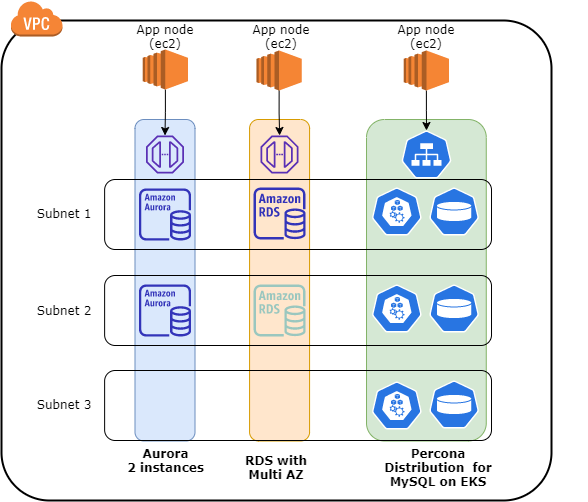
operator layout aws

I am not reporting the whole internal details about how the Percona Distribution for MySQL Operator (PDMO) works, for that please refer to the documentation https://www.percona.com/doc/kubernetes-operator-for-pxc/index.html

The table below is reporting the high level description of the solutions tested:

machines

*For PDMO we had to use machines with more resources to host additional services like HAProxy and the operator itself. But the resources allocated for the database services were reflecting the ones used AWS for Aurora and standard RDS. Said that, while for this exercise we have used machines with a bit more resources, it is common practice to have one powerful host node with multiple database clusters to optimise cost and resource utilization, I will cover this better later in the cost section.   

Down into the rabbit hole 

A lot of graphs can be found here: 

The name includes the test and the data set dimension.

In this section we will review the results of the tests by provider.

AWS

AWS is the most utilized Cloud provider and is also the one with more solutions when discussing Database services. I have tested and compared PDMO vs Aurora and standard RDS.

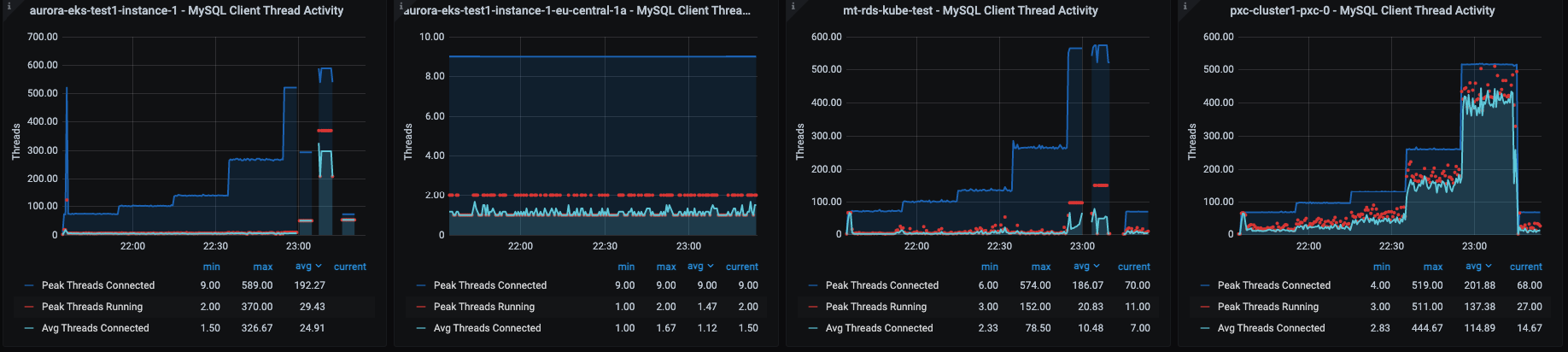
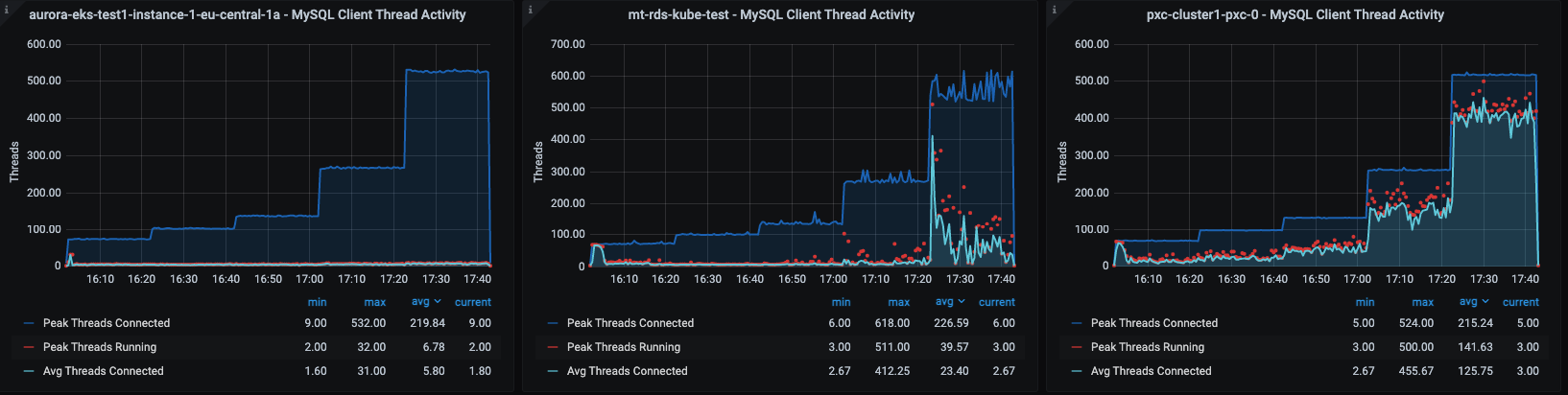
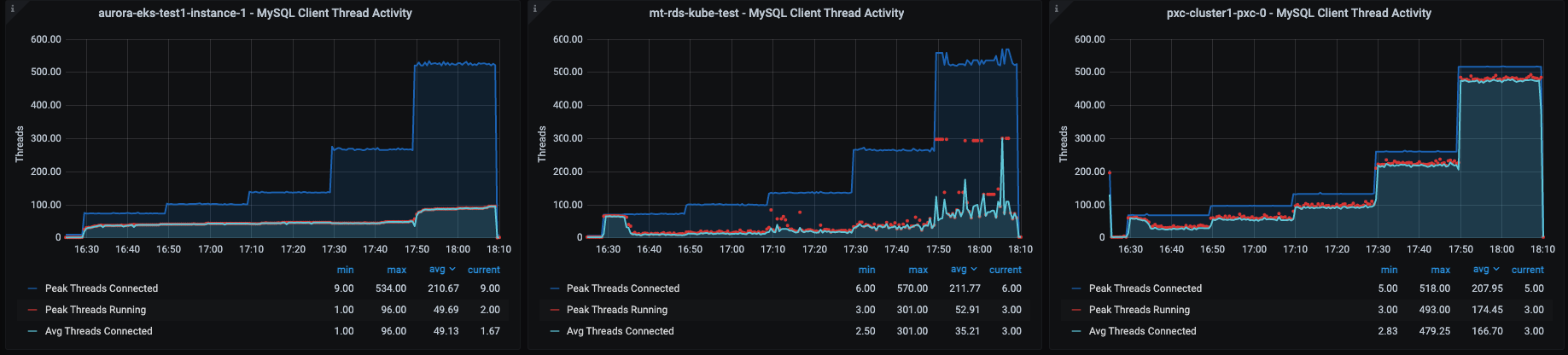
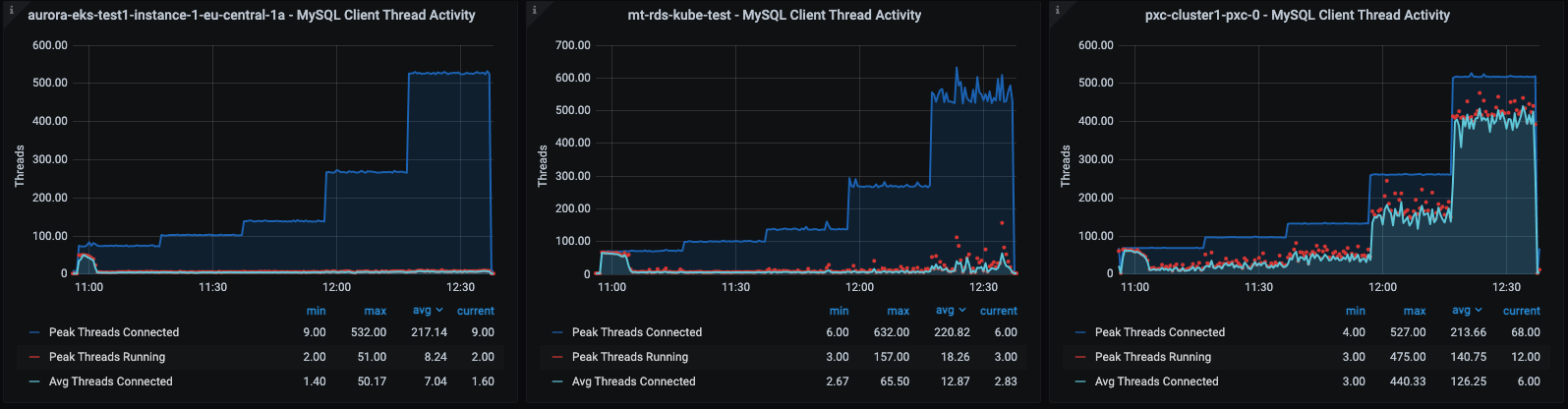
For clarity I am reporting two different sets of graphs for details. One is related to CPU, memory etc, the other is more MySQL specific. 

In this context we have the following:

  • aurora-eks-test1-instance-1; Primary node of the Aurora service
  • aurora-eks-test1-instance-1-eu-central-1a; Secondary node of the Aurora service
  • Mt-rds-kube-test; RDS instance 
  • pxc-cluster1-pxc-0 ; Pod serving the MySQL traffic for PDMO 

As you may notice from the graphs, the Aurora service automatically swap/failover from a node to another more than once.  

Checking Read Only traffic (scenario 1S)

Let us start with the easiest case, a simple new website with some editorial. As already mentioned this can be considered a Read Only case given the writes should be counted in few by minutes or even less. 

Small Dataset

As previously mentioned, this case is the first baby step, when your DB is really at an infant stage.

Y axis reports operations/sec
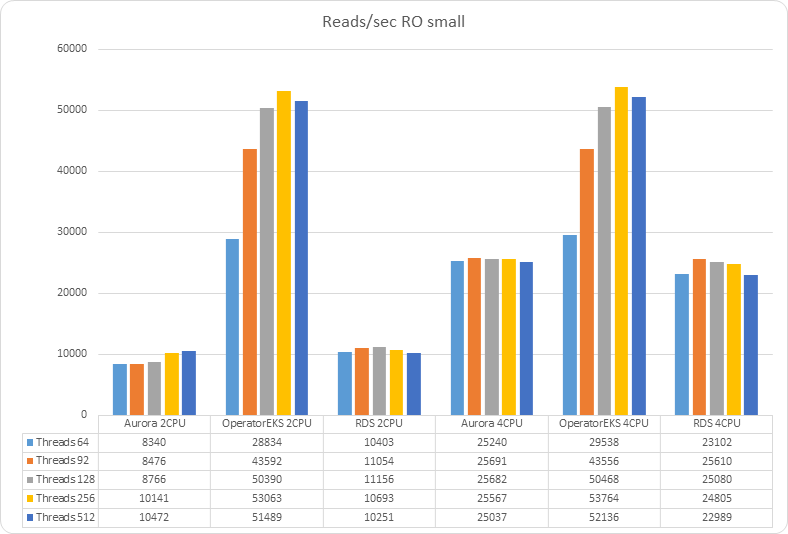
 chart 2021 09 28 Reads sec RO small 10

In case no matter if the dataset fits in memory or not, we can notice how the Percona MySQL operator is able to serve a higher amount of traffic in respect to the other AWS solutions. If we check what seems to be the limitation factor, we can see that:

 2 CPU

2 cpu ro small OS cpu

2 cpu ro small threads

4 CPU

4 cpu ro small OS cpu

4 cpu ro small threads

We can see how in both cases the AWs solutions reach 100% of CPU utilization, limiting the number of operations they can execute in memory.
Also notice how the load was automatically moved from one Aurora instance to another during the tests (CPUs graph).

Large Dataset

Now let's see what happens if I am successful and my website starts to increase in content, such that my dataset does not fit in memory, and as such I will have MySQL evicting old pages from memory
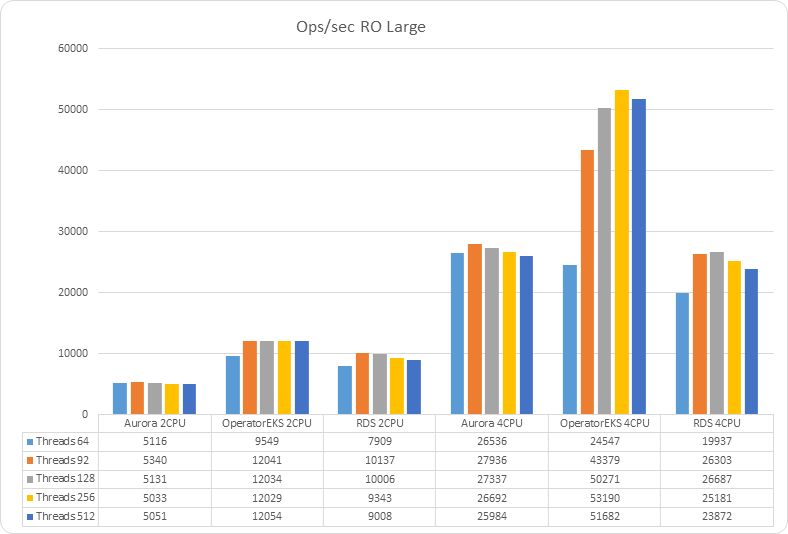
chart 2021 09 28 Ops sec RO Large 1

In case the dataset exceeds the dimension of the memory, PDMO is still performing significantly better than the other two solutions when using 4 CPUs. But it has a significant reduction of performance when using 2 CPUs.

2 CPUs

2 cpu ro large OS cpu

2 cpu ro large threads

Disk Latency

2 cpu ro large OS disk latency

The other relevant fact to notice is how the disk latency affected the reads for the PDMO when using a large dataset and 2 CPUs.
This negative effect doesn't show up in case of 4 CPUs 

4 CPUs 

4 cpu ro large OS cpu

4 cpu ro large threads

Also in the case of 4 CPUs we see the same behavior, with AWS solutions not able to scale and failing to serve traffic. 

Disk Latency

4 cpu ro large OS disk latency

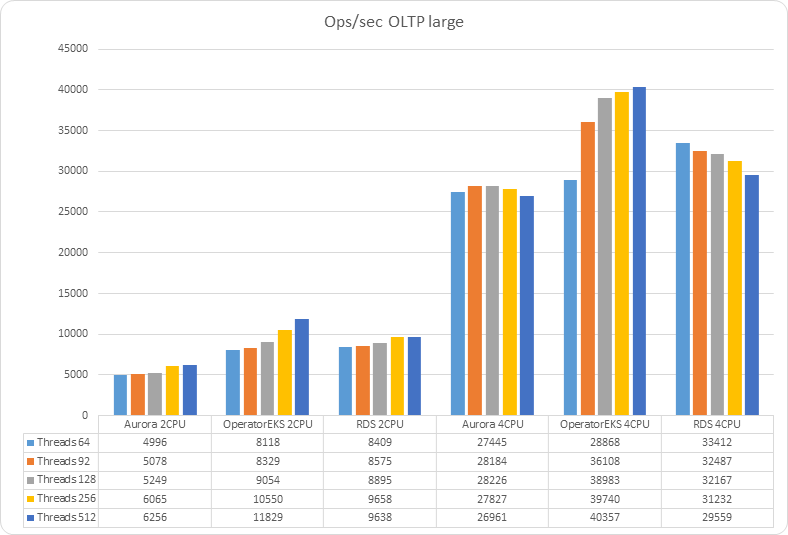
Checking OLTP (scenario 2S)

This case is obviously more complicated given the writes and transactions. The level of reads is still high, around 93% but all operations are enclosed inside transactions. 

In this case we MUST review in parallel the SMALL and LARGE dataset to better understand what is happening.

Operation/sec
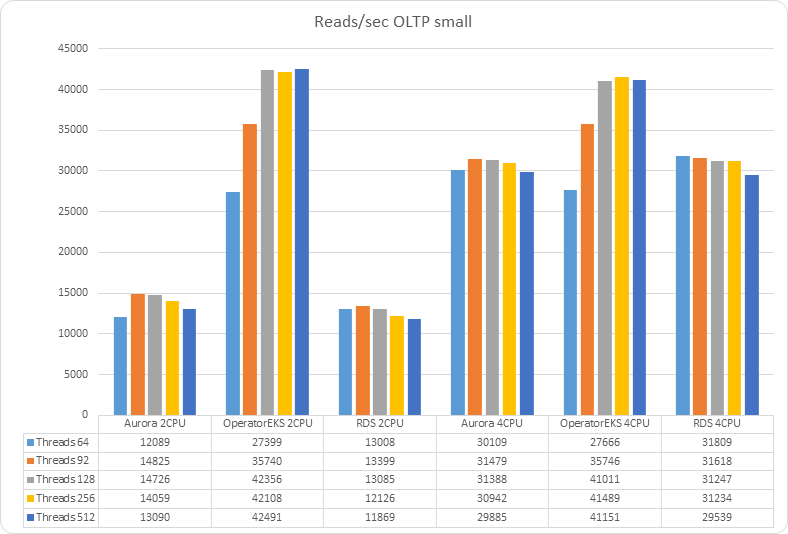
 chart 2021 09 28 Reads sec OLTP small 11 chart 2021 09 28 Ops sec OLTP large 2 


As you can see the solution using the Operator is overperforming in the case of small and large datasets. While AWS solutions are still suffering from the same CPU limitation we have seen in the read only load. 

2 CPUs small

2 cpu rw small OS cpu

 2 cpu rw small threads

2 CPUs Large

2 cpu rw large OS cpu

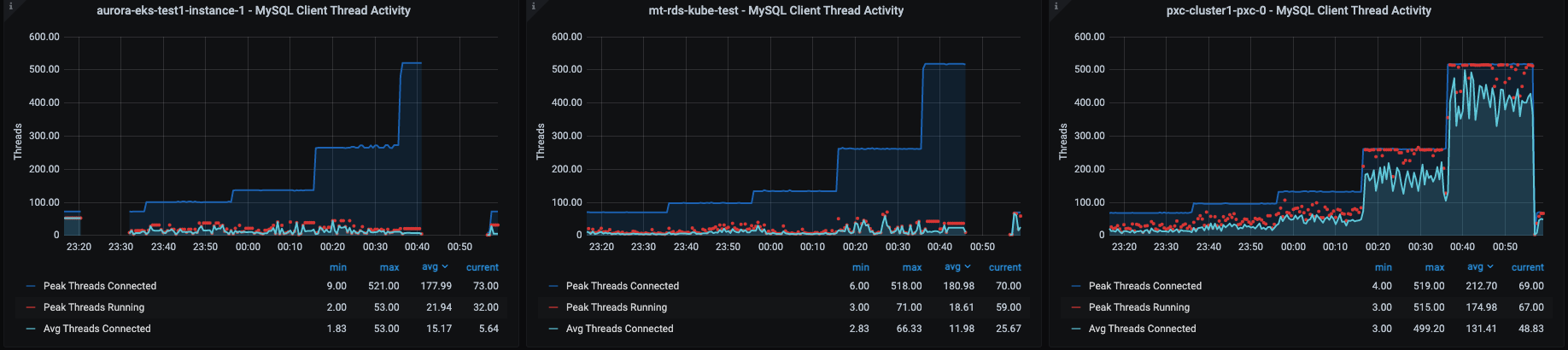
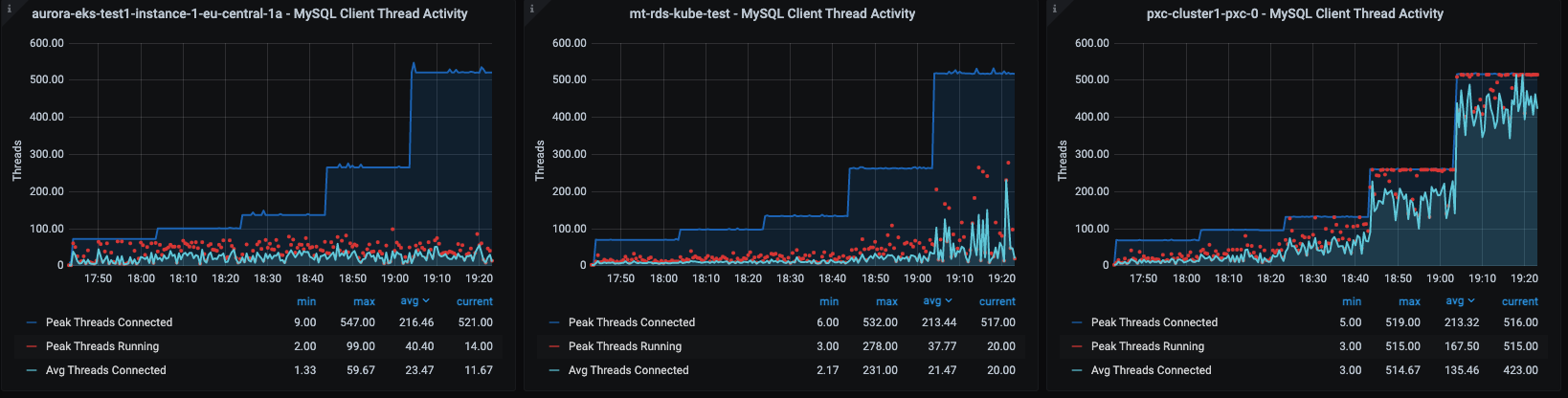
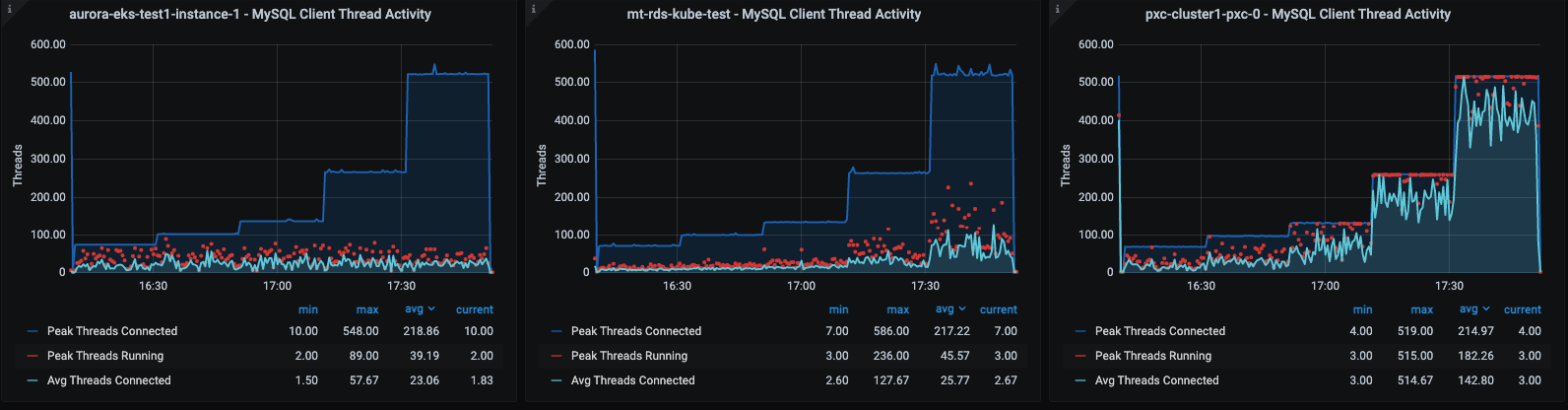
We can observe how CPUs resources in the case of AWS solutions are always at 100%, while PDMO can count on resource scaling.
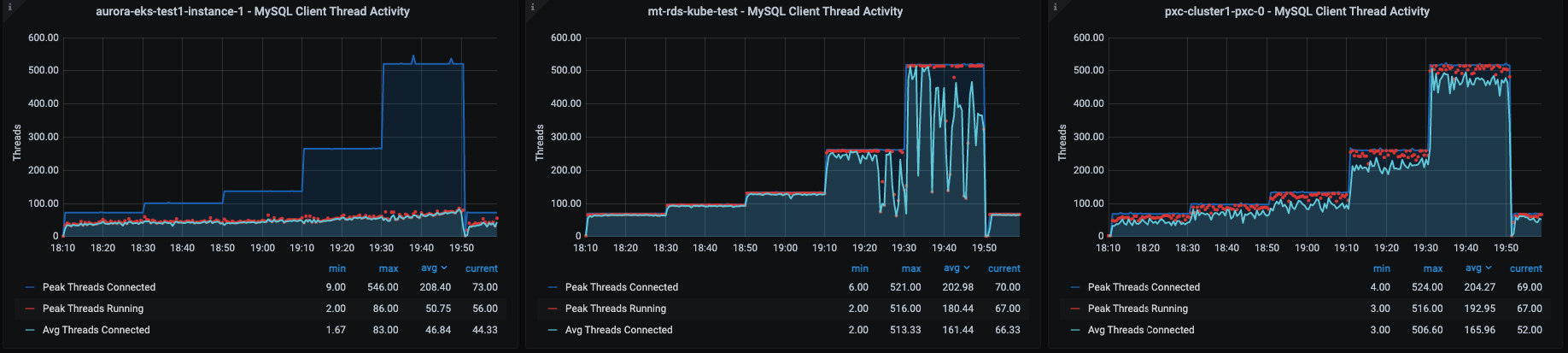
2 cpu rw large threads

2 CPUs large Disk Latency

2 cpu rw large OS disk latency

4 CPUs small

4 cpu rw small OS cpu

4 cpu rw small threads 

4 CPUs Small Disk Latency

4 cpu rw small OS disk latency

4 CPUs large

4 cpu rw large OS cpu

4 cpu rw large threads

4 CPUs Large Disk Latency

4 cpu rw large OS disk latency

With 4 CPUs available the Aurora solution can count in a bit more “space” to scale, but still not enough to result as efficient as PDMO.

As for the read only, we can see the disk latency significantly increase in the case of Large dataset, especially for the PDMO solution.  

It is interesting to see how Aurora is penalized not only by the CPU utilization but also by a very high disk latency. 


Latency 95pct (lower is better)

chart 2021 09 28 Latency 95 Pct (y axis in ms) OLTP small 20 chart 2021 09 28 Latency 95 Pct (y axis in ms) OLTP large 19 


Latency metrics reflect the operation trend, highlighting how the low CPU-resources/Disk-latency affects all solutions, especially in case of large datasets. 

Checking TPC-c (inspired) load (scenario 3S)

Also in this case we have that all the queries are encapsulated in a transaction and in this kind of test the read and write operations are close to being split at the 50% mark, so we expect to see a significant load on disk write operation and for the data replication mechanism.  

Operation/sec
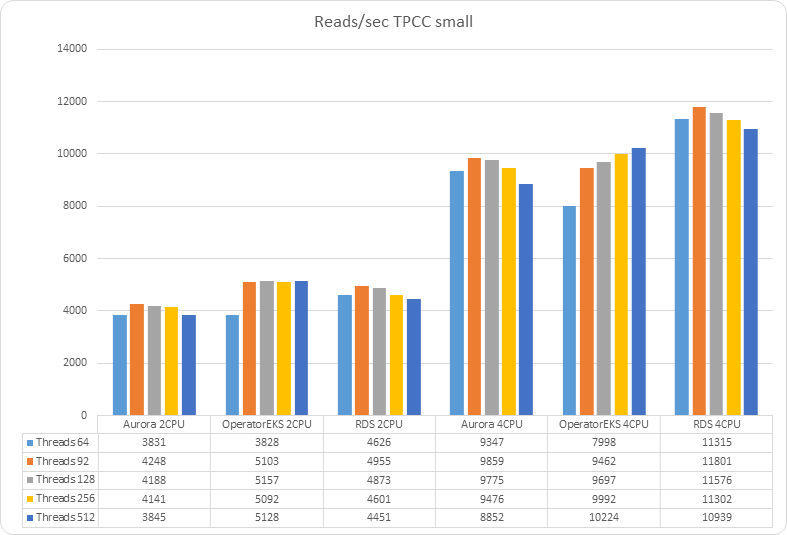
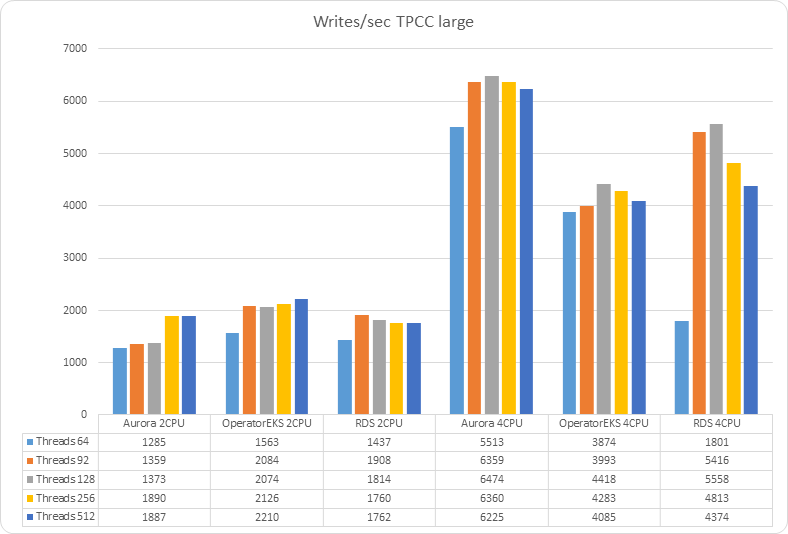
chart 2021 09 28 Reads sec TPCC small 12 chart 2021 09 28 Writes sec TPCC large 14


In this scenario PDMO results to be more penalized when the dataset is larger than the available memory. In some way this is expected, given the level of writing is such that the solution pays the cost of the virtual-synchronous replication mechanism used in PXC.

If we check the details we can see:

4 CPUs Large

 4 cpu tpcc large OS cpu

4 cpu tpcc large threads

4 CPUs Disck Latency

4 cpu tpcc large OS disk latency 

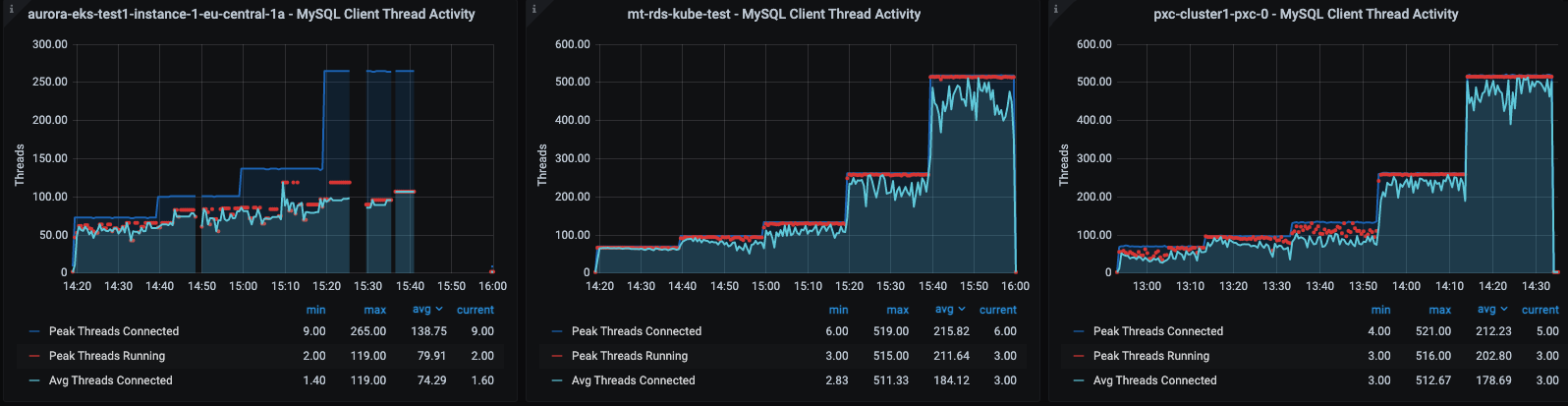
As we can see the PDMO node receiving the direct load is not crazy loaded, while the disk latency is higher than RDS with an average of 4ms write and 8ms for read operations.
But that is not enough to justify the delta we have in performance loss. What is preventing the solution from being as efficient as the other two?

PXC flow control
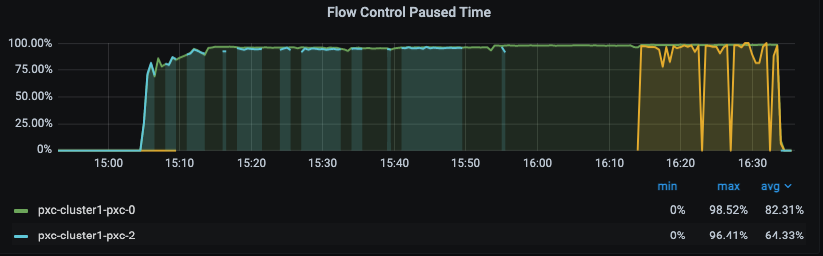
4 cpu tpcc large pxc flow control new

PDMO is using PXC as technology to offer service high availability and full data consistency. This means that the cluster must certify and apply all writes in any node at each commit, with the increase of the write operations this solution also increases the pressure on the replication layer and if any node has a delay in applying the write, that delay will affect the efficiency of the whole cluster. 

In our case we can see that nodes pxc-0 and pxc-2 are on hold for pxc-1 to perform the writes. 

We also have as side effect the increase of the sending queue on the primary node (pxc-0)
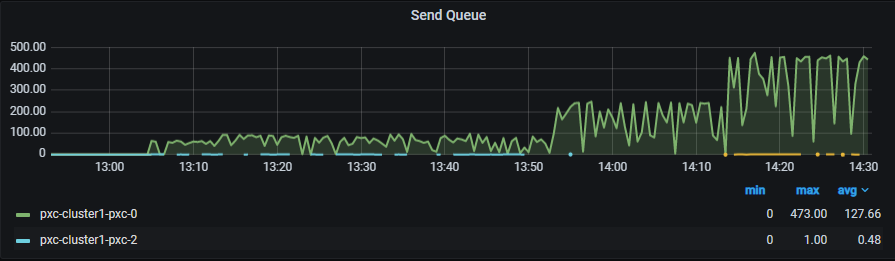
4 cpu tpcc large pxc send queue


Latency

chart 2021 09 28 Latency 95 Pct (y axis in ms) TPCC small 22 chart 2021 09 28 Latency 95 Pct (y axis in ms) TPCC large 21

Latency is just confirming us the picture we had from the operations.  

What should I pick? 

Before indicating what should be a good solution for what, let us talk about costs.

Costs

To discuss the cost, we need to make some assumptions. 

The first assumption is that we need to calculate the cost by solutions and not by node. This is because we cannot consider a solution with a single node for PDMO or Aurora. To be effective both require their production minimum requirements, which for Aurora is two nodes and for PDMO given is based on PXC 3 nodes. Given that calculating by node is a fictitious artifact, while calculating by solution gives you the real cost.   

The second assumption is that we can have more PDMO solutions running on the same Node. Which means we will have a better relation cost/benefit in utilizing larger nodes and use them to run multiple PDMO solutions. In that case, the only cost that will need to be added is the cost of the attached EBS volume per delivered POD. 


Let me provide an example of PDMO calculation. 

If I consider the minimal Node resource requirements, as we did for these tests, I will need to have:

Solution

Node Type

Monthly Cost

PDMO 2 CPU

R5.xlarge

1,609 USD

PDMO 4 CPU

R5.2xlarge

2,274 USD


But if we use a larger node that can host multiple PDMO like a r5.4xlarge (16 CPU 128GB) that can host multiple PDMO :

Solution

PDMO instances per node

Monthly Cost - full solution for PDMO

PDMO 2 CPU

3

1,202 USD

PDMO 4 CPU

2

1,803 USD


As you can see also if a solution based on r5.4xlarge has higher absolute cost per node, the fact you can run multiple PDMO in a node allows you to reduce the cost in a significant way by solution.   


Said that let us summarize the cost of the solutions:

Solution

Node Type

Monthly Cost

Aurora* 2 CPU

db.r5.large

$6,323.30 

Aurora* 4 CPU

db.r5.xlarge

$6,834.30 

RDS 2 CPU

db.r5.large

$1,329.80 

RDS 4 CPU

db.r5.xlarge

$1,753.20 

PDMO 2 CPU (single instance per delivered node)

r5.xlarge

$1,609.20 

PDMO 4 CPU (single instance per delivered node)

r5.2xlarge

$2,274.96 

PDMO 2 CPU (multiple instance per delivered node)

r5.4xlarge

$1,202

PDMO 4 CPU (single instance per delivered node)

r5.4xlarge

$1,803

* For Aurora we had to include an average number of operations based on the test executed. Please refer to: https://calculator.aws/#/createCalculator/AuroraMySQL


As you can see PDMO is just a little bit more expensive than RDS when deployed in single instance mode. But it also provides better performance in most cases and always has a higher level of High Availability, given PXC is used in the background. 

There is no discussion if you can use multiple PDMO on larger nodes, in that case the cost goes lower than RDS.

So what to pick

Read-only

Choosing is not only based on performance, but also how efficient the solution we pick is to perform the maintenance of our platform. In this regard both operator and Aurora offer a good level of automation. But PDMO was always performing better than the other two solutions. On top of that Aurora based solutions are more expensive than the others, so in the end, for me, choosing PDMO is the logical thing to do, being ready to eventually do a small scale-up in case I need more resources. This is another advantage of PDMO, I can eventually decide to add fragments of the CPU cycle, without the need to move to a higher and more expensive system.  

OLTP

In this case there is no doubt that PDMO is the solution to go to. Aurora can be seen as a possible replacement given that the RDS solution has a lower level of HA in respect to the other two. But as we know the Aurora costs are higher than any other compared solutions here.

TPCC

RDS is the solution to go to serve the load and save the money, but you will have a lower level of HA. If you are willing to cover the cost Aurora is the solution offering you good performance and high level of High Availability. 

Finally we can say that PDMO was penalized by the replication/certification mechanism in use in PXC but, the significant saving in terms of cost can justify the adoption, especially considering that with a limited scaling up in resources we can gain more traffic served. Scaling will never be as expensive as if we adopt Aurora as a solution.     

Conclusions

Trying to identify an entry point solution for a starting activity is harder than choosing a platform for something already well defined. There is a lot of uncertainty, about the traffic, the kind of operations, the frequency of them, the growth (if any). 

In my opinion there are already so many variables and things that can possibly go wrong, that we should try to adopt, if not the safest solution, the one that gives us a good level of confidence in what we will be able to achieve. 

I was not surprised to see products such as Aurora shine when we have Tpcc like load, but I was pleased to see Percona solution with the operator performing in an admirable way. 

Of course I was not using the settings coming from the vanilla installation, given they are for testing. So if you install PDMO in production you MUST change them  (see here for my cr.yaml) and I was counting on version 1.9.0 at least, without which PDMO is not even in the game. 

But it is obvious that Percona is on the right path, with a long road ahead, but we it is moving in the right direction.

Percona Distribution for MySQL Operatoris still a baby, but is growing fast, and the more we have people using, testing and providing feedback, the fastest Percona will be able to provide software that not only early adopters implement, but also the more conservative ones can use for their production.

References

https://calculator.aws/

Disclaimer 

My blog, my opinions. 

I am not, in any way or aspects, presenting here the official line of the company I am working for.

Comments

If you have comments or suggestions please add them to the linkedin post

No comments on “Compare Percona Distribution for MySQL Operator VS AWS Aurora and standard RDS”

Boosting Percona MySQL Operator efficiency

Details
Marco Tusa
MySQL
23 June 2021

Preface

Percona is well known for its offer of several outstanding fully open source, free to download software packages. And while Percona started as a MySQL focus company, nowadays it covers different technologies such as MySQL, Postgres and Mongodb.

In its constant effort to make life easier for our utilizer Percona had moved from providing single software packages, to Percona Distributions for MySQL, MongoDB and Postgres. Percona Distributions are a set of software packages that Percona has tested and certifies working together. That it easier to deploy architectural solutions requiring the use of multiple components, such as proxy, topology manager, backup software and more. 

But we are going even further, and with the release of Percona Distribution for MySQL/MongoDB Operator we are providing a high level of automation to roll out and manage solutions based on Percona Distributions. 

One of my tasks, as MySQL technical leader, is to identify optimal architectures to serve several common cases. Such as Percona Distribution for MySQL: High Availability with Group Replication Solution. Or in the case of  Percona Distribution for MySQL Operator, identify the different dimensions (low/mid/high utilization) and suggest a Vanilla setup with the scope to get the most out of the solution deployed.  

This is a long exercise, which started with a lot of internal discussions to identify what can make sense as traffic, then testing, identifying the saturation points, testing again and so on. 

It is during this process that I found a small problem (Feature Request). This small issue is preventing us from easily and dynamically modifying some parameters in the checks the Operator  uses. Given that we had to put the testing on hold until the above FR is implemented. As you can see it is a small thing but it will give us better control over the Operator behavior and will help to have a well tuned platform. 

This article is to show the level of improvement you can have with small but targeted tuning.To do so I used the smallest solution we have identified. The solution is dimensioned to serve a small website or a simple application with low level of traffic. 

The environment

To help identify a balanced setup we were using sysbench and sysbench-tpcc. The whole stack on GCP was composed of Application nodes with sysbench, 2 ProxySQL nodes for R/W split only, 3 VMS 8 CPU 32GB RAM, with the Percona operator managing the MySQL service.

Untitled Diagram

Tests

For this specific test we were running 68 - 96 -128 - 256 threads:

  • Sysbench read only
  • Sysbench read/write
  • Sysbench Tpc-c like 

The tests were run multiple times and the data considered is the consolidation of the multiple runs. 

We always run first on basic environments for baseline. Meaning no tuning for the MySQL or Operator, just dimension correctly disk space and BufferPool (and related).

Then we apply some tuning and run the tests multiple times eventually refining when/where needed. 

The code can be found here and here

And now the results…

Sysbench r/w tests

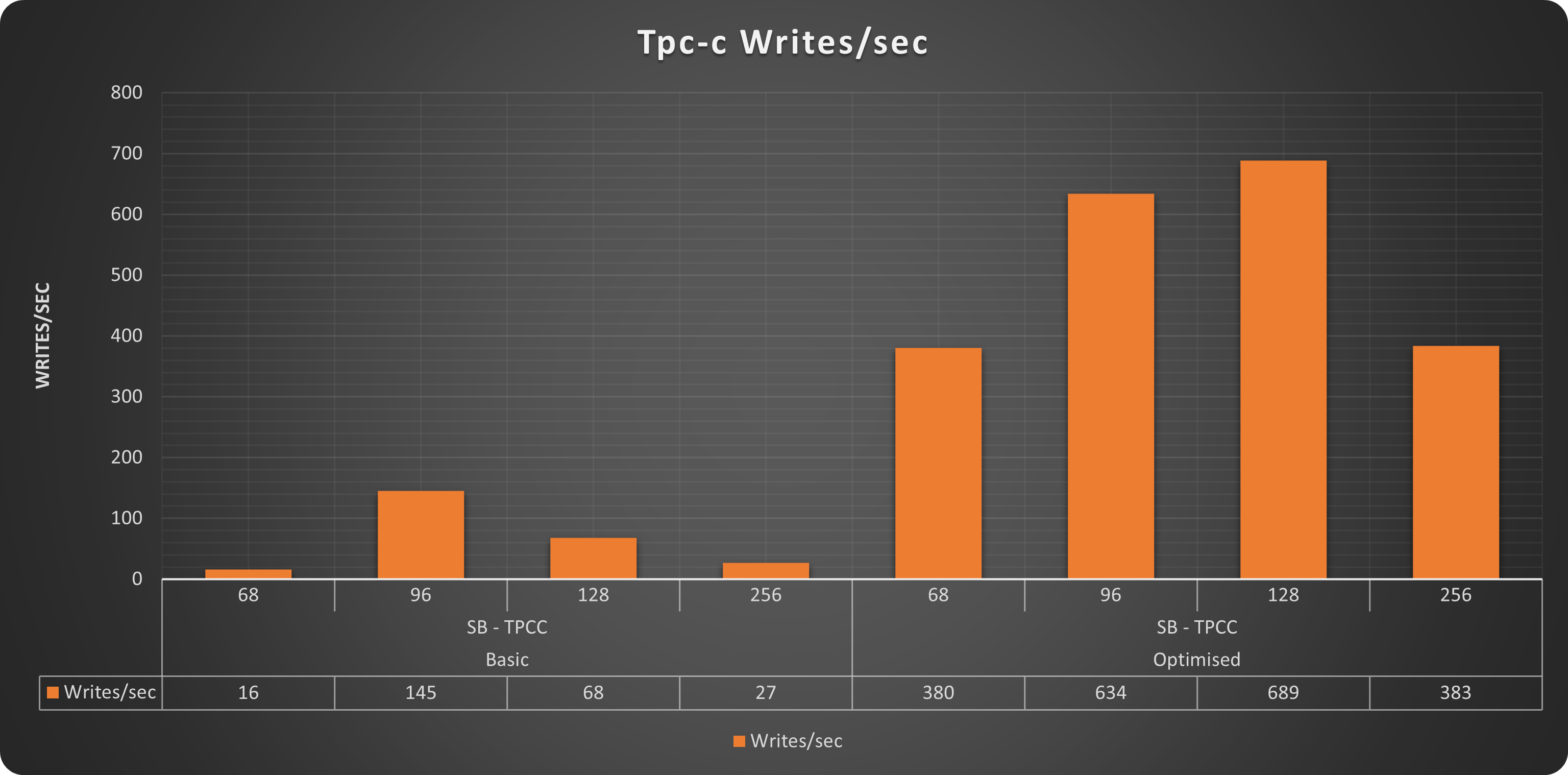
I am not going to describe in detail the images that I think are clear enough. Just keep in mind on the left we have the results from our baseline, on the right the same tests on the same platform with the optimization applied.

Operations

Picture6

Worth to mention that without tuning, the platform was not able to consistently scale up to 256 threads. While with a bit of adjustment not only it was able to serve 256 threads but we could have gone a bit further.

Reads

Picture7

Writes

Picture8

Comments

As you can see the sysbench tests clearly indicate that the platform with minor adjustment was acting better, and that it was able to serve more and with constant scaling. Let me add that almost all the tests runned on the “basic” platform had incidents, meaning as soon as the traffic was increasing, Sysbench was reporting connection interruptions or errors.

TPC-C

Operations

Picture10

Reads

Picture11

Writes

Picture12

Comments

Also for Tpc-c like tests we have exactly the same trend. With our “optimised” solution able to serve up to 1516 qps while the “basic” one was able to reach only 322. In this case Also the “optimised” solution was not able to scale up to 256 threads, but that makes sense, given the more intense write workload present in this test and the small dimension of the platform.


Wooha what have you changed?

You may think we have done crazy things to get this difference, but we did not.

Let us jump back. As indicated at the beginning I had opened a FR (https://jira.percona.com/browse/K8SPXC-749) to be able to tune some/most of the timeouts existing in the operator.

Why? Think about this, when you install a cluster on iron, you do not set it to be able to work only when the load is low, and all the components of the server are able to answer in nanoseconds. What you do instead is tune the whole system to accommodate the increasing load, and you will give to some elements more space for “flexibility” eventually expecting to have delays in answer. When doing so you also need to correctly align all the parameters that will be affected on cascade. For instance if you know your data nodes will be very busy serving queries, they may also slow down in answering internal health checks, but if you relax the cluster health checks and not the checks used for testing the cluster from operator point of view, the platform will be unbalanced and will not work correctly.

At the same time, if you do not tune the solution at all, you may end up with a platform that is theoretically able to serve the load, but that is crashing for artificial limitations. 

The last one is exactly what was happening with our “basic” solution. As it is the operator comes with parameters that allow it to work well, but that are not designed to scale. Is like having a server where your CPUs are always at 20% and if the applications ask more, a controller will chop them in fear of having too much load. But the fact is that you want to have the CPUs at 80% or the server will be underutilized. 

Anyhow what we have changed was some Innodb parameters, to allow internal operations to work better. Then we force consistent reads in PXC, which actually SLOW down the operations, and finally we tune the PXC cluster to be more flexible in its internal checks, avoiding having it to expel nodes unless really needed to. 

All the above were done using the Operator configuration, but then we had to work manually changing all the timeouts parameters used by the operator checks to be aligned with what we had defined in the cluster. 

In particular what we have changed was:

script                      line    value
/usr/bin/clustercheckcron   33      TIMEOUT=10
liveness-check.sh           23      TIMEOUT=5
readiness-check.sh          21      TIMEOUT=10
/usr/local/bin/check_pxc.sh 15      TIMEOUT=${CUSTOM_TIMEOUT:-10}

Wait .. why ProxySQL?

Ok this is another long discussion and I will cover it better in another article. For now just consider that HAProxy does not allow r/w splitting or other nice functionalities like firewalling etcetera etcetera. So the idea is simple, let us use the operator with what fits it better, and then decouple the special needs, eventually adding proxysql in a separate deployment. 

If you are scared of the cost of adding an additional block to the architecture:

Picture1 a

Picture1 b

Where:
ProxySQL means: Application → ProxySQL → HAProxy.
HAProxy means: Application → HAProxy.

Hope this puts your worries at rest, of course this is using the “optimised” solution.

Conclusions

Percona Distribution for MySQL Operator, is a constantly growing/improving solution. It also has a lot of interesting features, like being able to manage your backup/restore, point in time recovery, and more. But its adoption is still limited and it is normal to have some drawbacks like this one. It is on us who play with real production environments, or as in this case playing to define certified solutions, to give feedback to improve how the operator works, in order to make it a stronger product able to serve you better day by day.

Now we are going to wait for the FR to be implemented, and then we will recover our dimensioning work. 

No comments on “Boosting Percona MySQL Operator efficiency”

MySQL Static and Dynamic privileges (Part1)

Details
Marco Tusa
MySQL
15 June 2021

When trying to make things better, make our life very complicated.

I was working on a Security Threat Tool script, when I had to learn more about the interaction between static and dynamic privileges in MySQL 8.

Dynamic privileges is a “new” thing added in MySQL 8 to easily extend the privileges definition, and at the same time to provide more granularity. For instance the FLUSH operation now has dedicated Privileges and by scope. 

Dynamic privileges are assigned at runtime. Most of them are active when the server starts. But they can also change in respect to the components or plugin when activated. (https://dev.mysql.com/doc/mysql-security-excerpt/8.0/en/privileges-provided.html#privileges-provided-dynamic)

Static privileges are the classical privileges available in MySQL (https://dev.mysql.com/doc/mysql-security-excerpt/8.0/en/privileges-provided.html#privileges-provided-static)

Those are built into the server and cannot be changed.

So far all is good. If we can give more flexibility to the security mechanism existing in MySQL, well I am all for it.

My first step was to deal with the abuse of SUPER. 

About that the manual comes to help with a section: Migrating Accounts from SUPER to Dynamic Privileges (https://dev.mysql.com/doc/mysql-security-excerpt/8.0/en/privileges-provided.html#dynamic-privileges-migration-from-super) . 

Woo perfect!

Let us play a bit. First let me create a user:

create user secure_test@'localhost' identified by 'secret';
DC2-2(secure_test@localhost) [(none)]>show grants for current_user();
+-------------------------------------------------+
| Grants for secure_test@localhost                |
+-------------------------------------------------+
| GRANT USAGE ON *.* TO `secure_test`@`localhost` |
+-------------------------------------------------+

As you can see I can connect, but have no permissions.

On another terminal with an administrative account, let us do the classical operation to create a DBA:

GRANT ALL on *.* to secure_test@'localhost' WITH GRANT OPTION;

And now I have :

DC2-2(secure_test@localhost) [(none)]>show grants for current_user()\G
*************************** 1. row ***************************
Grants for secure_test@localhost: GRANT SELECT, INSERT, UPDATE, DELETE, CREATE, DROP, RELOAD, SHUTDOWN, PROCESS, FILE, REFERENCES, INDEX, ALTER, SHOW DATABASES, SUPER, CREATE TEMPORARY TABLES, LOCK TABLES, EXECUTE, REPLICATION SLAVE, REPLICATION CLIENT, CREATE VIEW, SHOW VIEW, CREATE ROUTINE, ALTER ROUTINE, CREATE USER, EVENT, TRIGGER, CREATE TABLESPACE, CREATE ROLE, DROP ROLE ON *.* TO `secure_test`@`localhost` WITH GRANT OPTION
*************************** 2. row ***************************
Grants for secure_test@localhost: GRANT APPLICATION_PASSWORD_ADMIN,AUDIT_ADMIN,BACKUP_ADMIN,BINLOG_ADMIN,BINLOG_ENCRYPTION_ADMIN,CLONE_ADMIN,CONNECTION_ADMIN,ENCRYPTION_KEY_ADMIN,FLUSH_OPTIMIZER_COSTS,FLUSH_STATUS,FLUSH_TABLES,FLUSH_USER_RESOURCES,GROUP_REPLICATION_ADMIN,INNODB_REDO_LOG_ARCHIVE,INNODB_REDO_LOG_ENABLE,PERSIST_RO_VARIABLES_ADMIN,REPLICATION_APPLIER,REPLICATION_SLAVE_ADMIN,RESOURCE_GROUP_ADMIN,RESOURCE_GROUP_USER,ROLE_ADMIN,SERVICE_CONNECTION_ADMIN,SESSION_VARIABLES_ADMIN,SET_USER_ID,SHOW_ROUTINE,SYSTEM_USER,SYSTEM_VARIABLES_ADMIN,TABLE_ENCRYPTION_ADMIN,XA_RECOVER_ADMIN ON *.* TO `secure_test`@`localhost` WITH GRANT OPTION

As you can see I have a bunch of Privileges assigned. 

To be honest, to have to identify exactly what each privilege does and how it interacts with the others is challenging.

Anyhow, the manual tell us:

"For each account identified by the preceding query, determine the operations for which it needs SUPER. Then grant the dynamic privileges corresponding to those operations, and revoke SUPER."

In our case:

revoke SUPER on *.* from secure_test@'localhost';

Which will remove the SUPER privileges, but what else will remain active? 

Let us try one of the easiest things, let us modify the variable super_read_only.

With super I can change the value of the variable without problems , but if I remove the SUPER privileges, what will happen? 

DC2-2(secure_test@localhost) [(none)]>show grants for current_user()\G
*************************** 1. row ***************************
Grants for secure_test@localhost: GRANT SELECT, INSERT, UPDATE, DELETE, CREATE, DROP, RELOAD, SHUTDOWN, PROCESS, FILE, REFERENCES, INDEX, ALTER, SHOW DATABASES, CREATE TEMPORARY TABLES, LOCK TABLES, EXECUTE, REPLICATION SLAVE, REPLICATION CLIENT, CREATE VIEW, SHOW VIEW, CREATE ROUTINE, ALTER ROUTINE, CREATE USER, EVENT, TRIGGER, CREATE TABLESPACE, CREATE ROLE, DROP ROLE ON *.* TO `secure_test`@`localhost` WITH GRANT OPTION
*************************** 2. row ***************************
Grants for secure_test@localhost: GRANT APPLICATION_PASSWORD_ADMIN,AUDIT_ADMIN,BACKUP_ADMIN,BINLOG_ADMIN,BINLOG_ENCRYPTION_ADMIN,CLONE_ADMIN,CONNECTION_ADMIN,ENCRYPTION_KEY_ADMIN,FLUSH_OPTIMIZER_COSTS,FLUSH_STATUS,FLUSH_TABLES,FLUSH_USER_RESOURCES,GROUP_REPLICATION_ADMIN,INNODB_REDO_LOG_ARCHIVE,INNODB_REDO_LOG_ENABLE,PERSIST_RO_VARIABLES_ADMIN,REPLICATION_APPLIER,REPLICATION_SLAVE_ADMIN,RESOURCE_GROUP_ADMIN,RESOURCE_GROUP_USER,ROLE_ADMIN,SERVICE_CONNECTION_ADMIN,SESSION_VARIABLES_ADMIN,SET_USER_ID,SHOW_ROUTINE,SYSTEM_USER,SYSTEM_VARIABLES_ADMIN,TABLE_ENCRYPTION_ADMIN,XA_RECOVER_ADMIN ON *.* TO `secure_test`@`localhost` WITH GRANT OPTION

As you can see SUPER is gone. 

DC2-2(secure_test@localhost) [(none)]>set global super_read_only=0;
Query OK, 0 rows affected (0.00 sec)

And I can still modify the global variable. WHY?  

The manual says that SYSTEM_VARIABLES_ADMIN from the dynamic privileges allow us to modify "Enables system variable changes at runtime". Well what if I revoke it? 

revoke SYSTEM_VARIABLES_ADMIN on *.* from  secure_test@'localhost';

DC2-2(secure_test@localhost) [(none)]>set global super_read_only=0;
ERROR 1227 (42000): Access denied; you need (at least one of) the SUPER or SYSTEM_VARIABLES_ADMIN privilege(s) for this operation

Great! So in order to really remove/limit super I need to also remove SYSTEM_VARIABLES_ADMIN. But is that all?

Well to make it short, no it is not. 

Checking the manual you can see that SUPER is affecting all these:

  • BINLOG_ADMIN,
  • CONNECTION_ADMIN,
  • ENCRYPTION_KEY_ADMIN,
  • GROUP_REPLICATION_ADMIN,
  • REPLICATION_SLAVE_ADMIN,
  • SESSION_VARIABLES_ADMIN,
  • SET_USER_ID,
  • SYSTEM_VARIABLES_ADMIN

And these are the ones by default. But we can also have others depending on the plugins we have active. 

So in theory to be sure we are removing all SUPER related privileges, we should:

REVOKE SUPER, BINLOG_ADMIN, CONNECTION_ADMIN, ENCRYPTION_KEY_ADMIN, GROUP_REPLICATION_ADMIN, REPLICATION_SLAVE_ADMIN, SESSION_VARIABLES_ADMIN, SET_USER_ID, SYSTEM_VARIABLES_ADMIN on *.* from secure_test@'localhost';

This, should leave us with the equivalent of a user without SUPER:

DC2-2(secure_test@localhost) [(none)]>show grants for current_user()\G
*************************** 1. row ***************************
Grants for secure_test@localhost: GRANT SELECT, INSERT, UPDATE, DELETE, CREATE, DROP, RELOAD, SHUTDOWN, PROCESS, FILE, REFERENCES, INDEX, ALTER, SHOW DATABASES, CREATE TEMPORARY TABLES, LOCK TABLES, EXECUTE, REPLICATION SLAVE, REPLICATION CLIENT, CREATE VIEW, SHOW VIEW, CREATE ROUTINE, ALTER ROUTINE, CREATE USER, EVENT, TRIGGER, CREATE TABLESPACE, CREATE ROLE, DROP ROLE ON *.* TO `secure_test`@`localhost` WITH GRANT OPTION
*************************** 2. row ***************************
Grants for secure_test@localhost: GRANT APPLICATION_PASSWORD_ADMIN,AUDIT_ADMIN,BACKUP_ADMIN,BINLOG_ENCRYPTION_ADMIN,CLONE_ADMIN,FLUSH_OPTIMIZER_COSTS,FLUSH_STATUS,FLUSH_TABLES,FLUSH_USER_RESOURCES,INNODB_REDO_LOG_ARCHIVE,INNODB_REDO_LOG_ENABLE,PERSIST_RO_VARIABLES_ADMIN,REPLICATION_APPLIER,RESOURCE_GROUP_ADMIN,RESOURCE_GROUP_USER,ROLE_ADMIN,SERVICE_CONNECTION_ADMIN,SHOW_ROUTINE,SYSTEM_USER,TABLE_ENCRYPTION_ADMIN,XA_RECOVER_ADMIN ON *.* TO `secure_test`@`localhost` WITH GRANT OPTION

CONCLUSIONS

In this first blog we have started to explore the usage of Dynamic privileges, and what we need to do to remove the SUPER privilege. 

Nevertheless, the list above is still a bit chaotic and unsafe. We still have SHUTDOWN or RELOAD or FILE, all of them are insecure and should be assigned with great care. In the next article we will see how to deal with Dynamic and Static privileges by Role and we also try to have clearer how they affect one another.

No comments on “MySQL Static and Dynamic privileges (Part1)”

MySQL Static and Dynamic privileges (Part2)

Details
Marco Tusa
MySQL
15 June 2021

When organizing things helps to simplify life.

In the previous article we start to explore dynamic privileges and the interaction with the static ones. We also saw how to remove SUPER privilege from a DBA account. 

What we did was go by subtraction. But in real life, we should act differently. We should ADD only what is really needed for the account to work correctly.

Adding privilege one by one, and for each user is problematic given the level of interaction they may have, and also prone to mistakes. 

Instead we can use ROLES to group, assign and revoke the correct privileges in a much easier way.

This is becoming even more important in MySQL with the advent of dynamic privileges.

What should we do to correctly use ROLEs? Well first of all design.  

The first step is to identify the ROLES, in doing so we need to keep a basic principle, make it simple, as such let us try to avoid having too many ROLES, or ROLE with too many cross functional privileges.

My proposal: 

  • DBA (The lord of the databases who can do all)
  • MaintenanceAdmin (DBA minions :-) they can perform only some action on the server, and server only)
  • UserAdmin (Can create users assign grants and so on)
  • MonitorUser (See all process and read from performance_schema)
  • DBManager (Can add/drop/modify schemas/tables/triggers/view/routines etc )
  • DBDesigner (Can modify specific objects mostly with a clear identification by schema/table)
  • ReplicationAdmin (Can add/change/remove start/stop replication also GR)
  • BackupAdmin (Can take backup, cannot restore)

We have 8 administrative ROLES and they should cover ALL we need for administrative tasks.

Now let us create them:

CREATE ROLE 'DBA', 'MaintenanceAdmin', 'UserAdmin', 'MonitorUser', 'DBManager', 'DBDesigner', 'ReplicationAdmin', 'BackupAdmin'

DC2-1(root@localhost) [mysql]>Select user,host from mysql.user where account_locked ='Y' and password_expired='Y' order by 1;
+------------------+------+
| user             | host |
+------------------+------+
| BackupAdmin      | %    |
| DBA              | %    |
| DBDesigner       | %    |
| DBManager        | %    |
| MaintenanceAdmin | %    |
| MonitorUser      | %    |
| ReplicationAdmin | %    |
| UserAdmin        | %    |
+------------------+------+
8 rows in set (0.00 sec)

Let us check the roles one by one and see what privileges we need to assign.

Our test user do not have any grant:

DC2-2(secure_test@localhost) [(none)]>show grants for current_user()\G
*************************** 1. row ***************************
Grants for secure_test@localhost: GRANT USAGE ON *.* TO `secure_test`@`localhost`

DBA,

well you may say .. easy GRANT ALL.

Wrong! As already indicated in the previous article, doing that will also assign SUPER, which is deprecated from MySQL 8.0.x. Let us start with the right foot and add ONLY what we need:

GRANT SELECT, INSERT, UPDATE, DELETE, CREATE, DROP, RELOAD, SHUTDOWN, PROCESS, FILE, REFERENCES, INDEX, ALTER, SHOW DATABASES, CREATE TEMPORARY TABLES, LOCK TABLES, EXECUTE, REPLICATION SLAVE, REPLICATION CLIENT, CREATE VIEW, SHOW VIEW, CREATE ROUTINE, ALTER ROUTINE, CREATE USER, EVENT, TRIGGER, CREATE TABLESPACE, CREATE ROLE, DROP ROLE ON *.* TO `DBA`@`%` WITH GRANT OPTION;
   
GRANT APPLICATION_PASSWORD_ADMIN,AUDIT_ADMIN,BACKUP_ADMIN,BINLOG_ADMIN,BINLOG_ENCRYPTION_ADMIN,CLONE_ADMIN,CONNECTION_ADMIN,ENCRYPTION_KEY_ADMIN,FLUSH_OPTIMIZER_COSTS,FLUSH_STATUS,FLUSH_TABLES,FLUSH_USER_RESOURCES,GROUP_REPLICATION_ADMIN,INNODB_REDO_LOG_ARCHIVE,INNODB_REDO_LOG_ENABLE,PERSIST_RO_VARIABLES_ADMIN,REPLICATION_APPLIER,REPLICATION_SLAVE_ADMIN,RESOURCE_GROUP_ADMIN,RESOURCE_GROUP_USER,ROLE_ADMIN,SERVICE_CONNECTION_ADMIN,SESSION_VARIABLES_ADMIN,SET_USER_ID,SHOW_ROUTINE,SYSTEM_USER,SYSTEM_VARIABLES_ADMIN,TABLE_ENCRYPTION_ADMIN,XA_RECOVER_ADMIN ON *.* TO `DBA`@`%` WITH GRANT OPTION;

That should be exactly the same as GRANT ALL, but without SUPER. 

To assign the ROLE to our test user:

GRANT `DBA`@`%` TO `secure_test`@`localhost`

Now our user has:

DC2-2(secure_test@localhost) [(none)]>show grants for current_user()\G
*************************** 1. row ***************************
Grants for secure_test@localhost: GRANT USAGE ON *.* TO `secure_test`@`localhost`
*************************** 2. row ***************************
Grants for secure_test@localhost: GRANT `DBA`@`%` TO `secure_test`@`localhost`

Correct you now see DBA as grant but that is not active:

DC2-2(secure_test@localhost) [(none)]>show grants for DBA@'%'\G
ERROR 1142 (42000): SELECT command denied to user 'secure_test'@'localhost' for table 'user'

To ACTIVATE a role you need to do it explicitly:

 SET DEFAULT ROLE DBA TO  secure_test@'localhost';

And have the user reconnect!

Once a role is activated we can also use:

show grants for current_user()\G

To check which privileges are now active for a specific user.

We can also control which role is active for which user querying the table mysql.default_roles. 

To remove the active role:

SET DEFAULT ROLE NONE TO  secure_test@'localhost';

Anyhow, NOW we have our DBA role available for all DBA and if we need to change something we can do it just there on the ROLE and not on each single user. 

MaintenanceAdmin,

GRANT EVENT, LOCK TABLES, RELOAD, SELECT, SHOW DATABASES, RELOAD, SHUTDOWN ON *.* TO `MaintenanceAdmin`@`%`;
GRANT BINLOG_ADMIN, CONNECTION_ADMIN, ENCRYPTION_KEY_ADMIN, GROUP_REPLICATION_ADMIN, REPLICATION_SLAVE_ADMIN, SESSION_VARIABLES_ADMIN, SET_USER_ID, SYSTEM_VARIABLES_ADMIN ON *.* TO `MaintenanceAdmin`@`%`;
GRANT `MaintenanceAdmin`@`%` TO `secure_test`@`localhost` ;

UserAdmin,

GRANT CREATE USER, GRANT OPTION, RELOAD, SHOW DATABASES ON *.* TO `UserAdmin`@`%`;
GRANT ROLE_ADMIN  ON *.* TO `UserAdmin`@`%`;
GRANT `UserAdmin`@`%` TO `secure_test`@`localhost` ;

MonitorUser,

GRANT PROCESS, REPLICATION CLIENT ON *.* TO `MonitorUser`@`%`;
GRANT SELECT ON performance_schema.* TO `MonitorUser`@`%`;
GRANT `MonitorUser`@`%` TO `secure_test`@`localhost` ;

DBManager,

GRANT ALTER, ALTER ROUTINE, CREATE, CREATE ROUTINE, CREATE TABLESPACE, CREATE TEMPORARY TABLES, CREATE VIEW, DELETE, DROP, DROP ROLE, EVENT, INDEX, INSERT, LOCK TABLES, RELOAD, SELECT, SHOW DATABASES, SHOW VIEW, TRIGGER, UPDATE  ON *.* TO `DBManager`@`%`;
GRANT SET_USER_ID, SHOW_ROUTINE ON *.* TO `DBManager`@`%`;
GRANT `DBManager`@`%` TO `secure_test`@`localhost` ;

DBDesigner,

GRANT ALTER, ALTER ROUTINE, CREATE, CREATE ROUTINE, CREATE VIEW, INDEX, SELECT, SHOW DATABASES, SHOW VIEW, TRIGGER ON *.* TO `DBDesigner`@`%`;
GRANT `DBDesigner`@`%` TO `secure_test`@`localhost` ;

ReplicationAdmin,

GRANT REPLICATION CLIENT ON *.* TO `ReplicationAdmin`@`%`;
GRANT REPLICATION_APPLIER, REPLICATION_SLAVE_ADMIN, GROUP_REPLICATION_ADMIN, SERVICE_CONNECTION_ADMIN ON *.* TO `ReplicationAdmin`@`%`;
GRANT SELECT on performance_schema.* TO `ReplicationAdmin`@`%`;
GRANT SELECT on mysql.* TO `ReplicationAdmin`@`%`;
GRANT `ReplicationAdmin`@`%` TO `secure_test`@`localhost` ;

BackupAdmin,

GRANT EVENT, LOCK TABLES, SELECT, SHOW DATABASES ON *.* TO `BackupAdmin`@`%`;
GRANT BACKUP_ADMIN ON *.* TO `BackupAdmin`@`%`;
GRANT `BackupAdmin`@`%` TO `secure_test`@`localhost` ;

Once all our ROLES are in, we can test them. For instance we can check our ReplicationAdmin checking the Binary Logs and stopping/starting our Group Replication (or normal Replication):

DC2-2(secure_test@localhost) [(none)]>show binary logs;
ERROR 1227 (42000): Access denied; you need (at least one of) the SUPER, REPLICATION CLIENT privilege(s) for this operation

DC2-2(secure_test@localhost) [(none)]>stop group_replication;
ERROR 1227 (42000): Access denied; you need (at least one of) the SUPER or GROUP_REPLICATION_ADMIN privilege(s) for this operation

Also if created and assigned the role is not active. Let us now enable the role for the user:

SET DEFAULT ROLE ReplicationAdmin  TO  secure_test@'localhost';

Remember to reconnect!

DC2-2(secure_test@localhost) [(none)]>show binary logs;
+---------------+-----------+-----------+
| Log_name      | File_size | Encrypted |
+---------------+-----------+-----------+
| binlog.000011 | 113802321 | No        |
| binlog.000012 |     19278 | No        |
+---------------+-----------+-----------+
2 rows in set (0.00 sec)

DC2-2(secure_test@localhost) [(none)]>stop group_replication;
Query OK, 0 rows affected (5.25 sec)

DC2-2(secure_test@localhost) [(none)]>select * from  performance_schema.replication_group_members;
+---------------------------+--------------------------------------+-------------+-------------+--------------+-------------+----------------+
| CHANNEL_NAME              | MEMBER_ID                            | MEMBER_HOST | MEMBER_PORT | MEMBER_STATE | MEMBER_ROLE | MEMBER_VERSION |
+---------------------------+--------------------------------------+-------------+-------------+--------------+-------------+----------------+
| group_replication_applier | 7fddf04f-9797-11eb-a193-08002734ed50 | gr5         |        3306 | OFFLINE      |             |                |
+---------------------------+--------------------------------------+-------------+-------------+--------------+-------------+----------------+
1 row in set (0.00 sec)

DC2-2(secure_test@localhost) [(none)]>start group_replication;
Query OK, 0 rows affected (3.70 sec)

DC2-2(secure_test@localhost) [(none)]>select * from  performance_schema.replication_group_members;
+---------------------------+--------------------------------------+-------------+-------------+--------------+-------------+----------------+
| CHANNEL_NAME              | MEMBER_ID                            | MEMBER_HOST | MEMBER_PORT | MEMBER_STATE | MEMBER_ROLE | MEMBER_VERSION |
+---------------------------+--------------------------------------+-------------+-------------+--------------+-------------+----------------+
| group_replication_applier | 79ede65d-9797-11eb-9963-08002734ed50 | gr4         |        3306 | ONLINE       | PRIMARY     | 8.0.23         |
| group_replication_applier | 7e214802-9797-11eb-a0cf-08002734ed50 | gr6         |        3306 | ONLINE       | SECONDARY   | 8.0.23         |
| group_replication_applier | 7fddf04f-9797-11eb-a193-08002734ed50 | gr5         |        3306 | ONLINE       | SECONDARY   | 8.0.23         |
+---------------------------+--------------------------------------+-------------+-------------+--------------+-------------+----------------+
3 rows in set (0.01 sec)

And these are the privileges active:

DC2-2(secure_test@localhost) [(none)]>show grants for current_user()\G
*************************** 1. row ***************************
Grants for secure_test@localhost: GRANT REPLICATION CLIENT ON *.* TO `secure_test`@`localhost`
*************************** 2. row ***************************
Grants for secure_test@localhost: GRANT GROUP_REPLICATION_ADMIN,REPLICATION_APPLIER,REPLICATION_SLAVE_ADMIN,SERVICE_CONNECTION_ADMIN ON *.* TO `secure_test`@`localhost`
*************************** 3. row ***************************
Grants for secure_test@localhost: GRANT SELECT ON `mysql`.* TO `secure_test`@`localhost`
*************************** 4. row ***************************
Grants for secure_test@localhost: GRANT SELECT ON `performance_schema`.* TO `secure_test`@`localhost`
*************************** 5. row ***************************
Grants for secure_test@localhost: GRANT `BackupAdmin`@`%`,`DBA`@`%`,`DBDesigner`@`%`,`DBManager`@`%`,`MaintenanceAdmin`@`%`,`MonitorUser`@`%`,`ReplicationAdmin`@`%`,`UserAdmin`@`%` TO `secure_test`@`localhost`
5 rows in set (0.00 sec)

Conclusions

Using the ROLES allows us to modify the needed privileges in one place, and at the same time will allow us to keep under control the possible proliferation of dynamic privileges due the use of components or plugins, significantly reducing the complexity of having multiple privileges sources.

Roles are normally used in the most common Databases and MySQL had implemented them quite late. But using roles is the natural evolution of how we should deal with user grants when moving from small platforms to medium/large. 

The time when we assign single user privileges IS GONE, welcome to 2021 MySQLlers!


For your convenience I am distributing a simple SQL file with all commands to create the Roles as described in this article(link to github)

References

https://dev.mysql.com/doc/refman/8.0/en/roles.html

https://lefred.be/content/some-queries-related-to-mysql-roles/

https://lefred.be/content/mysql-8-0-listing-roles/


https://lefred.be/content/mysql-8-0-roles-and-graphml/

No comments on “MySQL Static and Dynamic privileges (Part2)”

260 (Thousands) thanks

Details
Marco Tusa
MySQL
31 May 2021

Percona live is over, and we finally get some feedback about our presentations.

Initially I had 3 presentations to give:

  • Comparing High Available Solutions With Percona XtraDB Cluster and Percona Server With Group Replication.
  • Comparing Hash Join solution, the good, the bad and the worse. The New version 2021.
  • Boosting MySQL NDB cluster & MySQL Innodb Cluster with PrxySQL V2

But when I saw we were having a lot of great submissions, I decided that it would be better for the conference and for Percona to drop 2 of them and leave some free slots for others.

That has always been my line of conduct, I do not think we should have speakers with multiple talks unless exceptions.  I know in the past I had been presenting multiple times, but that is why I am stating this now, more and more.

Anyhow, the remaining talk was Comparing High Available Solutions With Percona XtraDB Cluster and Percona Server With Group Replication. Which is a high level discussion about High Availability and the two main solutions Percona provides for it. 

The presentation was previously recorded and played during the event. This allowed me to interact during the presentation much more than if I had to do it live.thankyou

I thought we had a good level of interactions and discussion which is always a good sign, but when we finally got the feedback I discovered my session had 260 attendees.  

Now, I am still trying to get more info (wondering why it is so difficult to get) but from what I discovered so far, it was in the first three most attended. 

Given that I want to THANK YOU to all who have been there. I want to say one million times THANK YOU to all the ones who had also interacted during the presentation.

The reason to be for a speaker is to have not only people in the room, but people who interact because they are interested.
I like to think this is the result of years of honest and unbias blogging and speaking. So once more thank you! 

Percona had not publish it yet on the official site, I am sharing it from youtube. In case you are still interested to view it, unfortunately the chat interaction is not there, given this was my original recording I had passed for the conference, but better than nothing right?


And now few comments about the conference. 

In general it was a good conference, I think we had a decent mix of technical and less technical content. I really enjoyed the key notes with Amanda Brock and after Luis Villa. I can be more in alignment with one instead of the other, but the topic and the side discussion in the chat was great.

About trying to follow the tracks and trying to attend the most interesting speeches (for me), I have to say I was a bit disappointed.


In my article here I was giving an indication of which presentations I was going to attend or when in conflict I was expecting to be able to see the recording. 

But there had been some unexpected inconveniences. 

The first one, positive, was that I wanted to attend more talks than the ones in the list. The second one, negative, was that the conference organization did not provide the recording after the speech. Actually as mentioned above most of them are still not published.

Now, while I understand that in case of LIVE talk, you may need some time to put them up, I do not get why we were not publishing the recording, as they were, after the official slot was over. Any additional refining or editing could have been done later, but in the meantime people would have been able to get better service and attend more.

Point was that as soon as I discovered it was not possible to watch the recording after the presentation, I started to keep on at least two screens, and record what I cannot focus on to be able to watch it later. Very annoying and disappointing. But hey space for improvement right? Next online event can be better. 

Another thing I liked was the platform used for the conference, easy, clean and allowed a lot of “offline” sharing. Yes, sometimes we had to reload the page to have the presentation running, but that was not a big deal.

I want to mention again the great work done by the Percona marketing team in making this event a great success. All of them, but special mention is for Bronwyn Campbell and Valentina Lago, without them Percona live 2021 would NOT be what it was.

Finally, while all of us around the globe HOPE to be able to attend the next conference in person, I strongly doubt this will be possible. We MUST keep in mind conferences as Percona Live is a global event. That will make it very unlikely to have people attending in person soon. Obviously the option is to limit it to a regional event, which for me will mean to diminish its relevance in a very impactful way. I miss meeting in person, but I would prefer to have the conference online, if that means I will miss a huge part of the speakers and their content!

And I may be pessimistic, but I doubt we will be in a safe position before the next event. 

Well that is all for now, but stay tuned… because the two missed presentations are coming ;) 


To all THANK YOU two hundred sixty thousand times once more.

thankyou

No comments on “260 (Thousands) thanks”

More Articles …

  1. Percona Live 2021 - my agenda picks
  2. Inconsistent voting in PXC
  3. Online DDL with Group Replication Percona Server 8.0.22 (and MySQL 8.0.23)
  4. What you can do with Auto-failover and Percona Server Distribution (8.0.x)
  5. Percona Distribution for MySQL: High Availability with Group Replication solution
  6. Who is drop-in replacement of 
  7. Full read consistency within Percona Operator for MySQL
  8. Percona Operator for MySQL (HAProxy or ProxySQL?)
  9. Support for Percona XtraDB Cluster in ProxySQL (Part Two)
  10. Support for Percona XtraDB Cluster in ProxySQL (Part One)
Page 6 of 25
  • Start
  • Prev
  • 1
  • 2
  • 3
  • 4
  • 5
  • 6
  • 7
  • 8
  • 9
  • 10
  • Next
  • End

Related Articles

  • The Jerry Maguire effect combines with John Lennon “Imagine”…
  • The horizon line
  • La storia dei figli del mare
  • A dream on MySQL parallel replication
  • Binary log and Transaction cache in MySQL 5.1 & 5.5
  • How to recover for deleted binlogs
  • How to Reset root password in MySQL
  • How and why tmp_table_size and max_heap_table_size are bounded.
  • How to insert information on Access denied on the MySQL error log
  • How to set up the MySQL Replication

Path

  1. Home
  2. MySQL Blogs
  3. Some fun around history list

Latest conferences

We have 4339 guests and no members online

login

Remember Me
  • Forgot your username?
  • Forgot your password?
Bootstrap is a front-end framework of Twitter, Inc. Code licensed under MIT License. Font Awesome font licensed under SIL OFL 1.1.