Sidebar

Main Menu Mobile

  • Home
  • Blog(s)
    • Marco's Blog
  • Technical Tips
    • MySQL
      • Store Procedure
      • Performance and tuning
      • Architecture and design
      • NDB Cluster
      • NDB Connectors
      • Perl Scripts
      • MySQL not on feed
    • Applications ...
    • Windows System
    • DRBD
    • How To ...
  • Never Forget
    • Environment
  • Search
TusaCentral
  • Home
  • Blog(s)
    • Marco's Blog
  • Technical Tips
    • MySQL
      • Store Procedure
      • Performance and tuning
      • Architecture and design
      • NDB Cluster
      • NDB Connectors
      • Perl Scripts
      • MySQL not on feed
    • Applications ...
    • Windows System
    • DRBD
    • How To ...
  • Never Forget
    • Environment
  • Search

MySQL Blogs

My MySQL tips valid-rss-rogers


The 10 TB Scale Survival Guide for Percona Operator PXC on Kubernetes

Details
Marco Tusa
MySQL
16 February 2026
    1. The Safe Operation Playbook: Critical Fixes
      1. 1. Stop Starving Your Recovery Container
      2. 2. The Cloud Storage Problem: EBS is Not Trustable
      3. 3.  Zero-Downtime is Mandatory (Say No to Direct SQL DDL)
    2. Hot Data Subset vs. The Whole Barn
      1. Actionable Summary for the Team
  1. Conclusions
  2. Notes:

"What happens when you run a 10 TB MySQL database on Kubernetes?" 


That's the question many of our customers and users asked and honestly, we were extremely curious ourselves.

So, we ditched the weekend plans, rolled up our sleeves, and jumped down the rabbit hole. What we found was far more challenging (and perhaps a bit more "psychedelic") than expected. We spent days rigorously testing the Percona Operator for PXC at massive scale. 

This blog post distills all our findings into the most critical, actionable advice you need to ensure your high-scale environment not only survives but operates reliably.

If you are lazy and prefer to watch a video, here is the presentation I did at the MySQL Belgian days in January 2026.

First of all, what environment did we use? 

Well forget about 4Gb ram or using the millesimal set on CPUs. You need heavy stuff, you need power, you need the mega-super-duper tank not the small bike, well if you can pay for it of course. Anyhow we have tested on something that is not small and not too huge as well, all in AWS/EKS.


The AWS instance type chosen for the testing environment was m7i.16xlarge, combined with an io2 storage class provisioned at 80,000 IOPS.

This configuration was selected because:

  • The m7i.16xlarge is a general-purpose instance with custom 4th Generation Intel Xeon Scalable processors, offering 64 vCPUs and 256 GiB of high-bandwidth DDR5 memory. This robust computational and memory capacity ensures that CPU or memory are unlikely to be limiting factors during initial testing of a large-scale, high-performance MySQL cluster on EKS.
  • Its 20 Gbps dedicated EBS bandwidth and up to 80,000 maximum IOPS to EBS perfectly complement the high-performance io2 Block Express storage volume.
  • By provisioning the storage to the maximum rated IOPS of the underlying instance type, the aim was to create a stress-testing environment that isolates potential performance constraints in the MySQL operator, Percona architecture, Kubernetes storage mechanisms (CSI/EBS), or database configuration, rather than hitting a hardware-imposed ceiling. This allows for a precise analysis of operational overheads and bottlenecks when the I/O subsystem is not the weakest link, which is critical when scaling a database to 10 TB of data.


Did it go as we would like to? Well long story short, not in full but I was expecting worse … into the rabbit hole we go.


We fully validated the cluster's ability to scale, but here's what surprised (and alarmed) us the most:

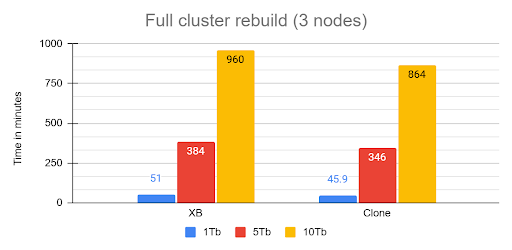
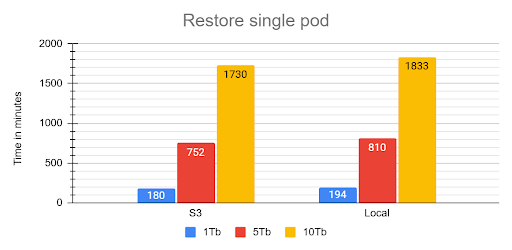
  • The 16-Hour Naptime MTTR (Mean Time To Recover): Full cluster recovery time for the 10 TB dataset clocked in at an eye-watering 960 minutes (16 hours)! If your business requires a guaranteed 1-hour Recovery Time Objective (RTO), you're going to have a very awkward conversation with your boss.

The rebuild operation from cluster crash was executed recovering the first node from snapshot then, letting the cluster recover using internal recovery mechanism.

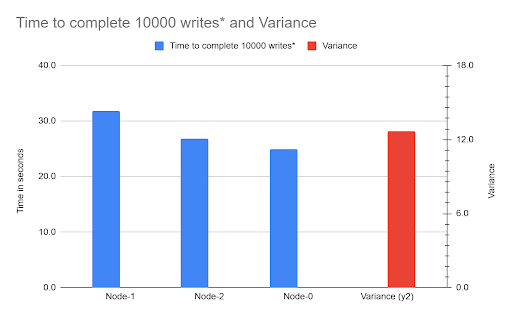
  • The Unruly Cloud Storage: We provisioned high-performance AWS EBS volumes (80,000 IOPS), yet we hit a wall due to Galera Flow Control. The root cause? One node's volume had a 21% performance degradation compared to the others. The entire synchronous cluster was choked by the single slowest volume.

  • The Starved Recovery Container: We discovered the restore process's most time-consuming phase the single-threaded redolog apply was bottlenecked because the default recovery container only gets a laughably default memory allocation (around 100 MB). This process consumed 92% of the total restore time.

The Safe Operation Playbook: Critical Fixes

You can tame the data monster, but you have to stop using the default settings. Your focus must shift to I/O consistency, recovery optimization, and mandatory zero-downtime practices.

1. Stop Starving Your Recovery Container

The single most effective action to improve your RTO is giving the restore container more memory to efficiently process the redolog.

  • The Fix: You must override the inadequate defaults in your recovery.yaml specification.
  • Recommendation: Set memory: 4Gi and cpu: 2000m (2 full cores). This directly reduces the time spent on the single-threaded redolog apply phase, chipping away at that painful 16-hour recovery window. This will alleviate and not resolve the situation though. 
  • Redefine Recovery SLO: Since the Operator waits for full cluster recovery before HAProxy serves traffic, you must redefine your internal service goal to Minimal High Availability (HA) (two out of three nodes synced), you can achieve it increasing the size of the cluster by steps, so first one node then add the second and so on. This allows you to claim service is resumed in hours (or less, if optimized) rather than 16 hours.

2. The Cloud Storage Problem: EBS is Not Trustable

For critical, high-scale PXC clusters, the testing proved that high-cost abstracted cloud volumes (EBS) are too unpredictable due to the risk of I/O variability.

  • The Problem: I/O variance is a single point of failure that triggers Galera Flow Control. Because PXC is synchronous, if one node is 21% slower, the entire cluster is 21% slower.
  • The Long-Term Solution: For mission-critical 10 TB systems, mandate a review for dedicated storage solutions. Look for cloud alternatives that offer strict I/O guarantees, such as dedicated NVMe instances, to bypass the performance abstraction layer and ensure every node performs equally. Or opt for direct attach (fiberchannel) solutions with a SAN tune to prevent volume overlaps. 

3.  Zero-Downtime is Mandatory (Say No to Direct SQL DDL)

On a Percona XtraDB Cluster, DDL is replicated using Total Order Isolation (TOI). This means that direct ALTER TABLE operations cause a full, unacceptable table lock, resulting in downtime.

  • The Rule: Use PTOSC (Percona Online Schema Change) for all DDL, including simple index operations. It takes significantly longer, but it is the only way to avoid service interruption.
  • The Capacity Warning: PTOSC temporarily duplicates the entire target table. Ensure you have meticulous capacity planning for temporary disk space to prevent a cluster-wide storage saturation crash!
  • Large DML: Break all large UPDATE and DELETE operations into small, iterative batches (chunks) to minimize the scope and duration of transactional locks.

Hot Data Subset vs. The Whole Barn

The most fascinating performance finding was how much the application's access pattern affects performance at scale. This dictates how well your InnoDB Buffer Pool can save you from a slow disk.

Access Pattern Description Performance Outcome
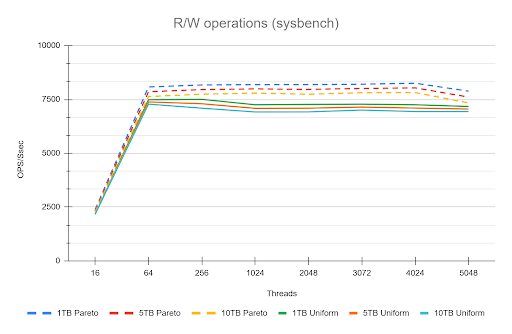
Skewed/Live Subset (Pareto) Application uses a small, "hot" subset of data (e.g., the last few weeks' transactions). Good. The Buffer Pool works perfectly. We saw lower I/O Wait (IOWAIT) and sustained high throughput up to 4024 concurrent threads. The 10 TB cluster runs like a 1 TB cluster.
Uniform Access Queries are distributed uniformly across the entire dataset (10 TB). Not so good. Forces high disk activity because the Buffer Pool cannot cache everything. Resulted in high IOWAIT and immediate performance degradation past the CPU limit.

Remember that the tests used a 50/50 read/write workload. Even when operating on a "hot" subset in the buffer pool, the persistent write and purge operations still required disk I/O, which likely reduced the visible performance difference (delta) between the hot subset and uniform access patterns. This delta would be larger with a higher percentage of read operations. 

The Bottom Line is that your 10 TB cluster is faster if your application keeps queries focused on the "hot" data subset. Uniform access patterns force the system to pay the full 10 TB I/O cost, every time. 

Actionable Summary for the Team

  1. Recovery Override: Set memory: 4Gi in the recovery spec to reduce the negative impact of the 92% redolog apply bottleneck.
  2. DDL Enforcement: PTOSC is mandatory for all schema changes. Batch large DML.
  3. Storage Fix: Do not trust EBS/abstracted storage for 10 TB. Plan an architectural shift toward guaranteed I/O (e.g., dedicated NVMe instances).
  4. Data Mobility: Standardize on MyDumper/Loader for all bulk operations.
  5. Data distribution/access: If You Have a Hot Data Subset, Offload the Rest. The better performance seen with the "hot" data subset (Pareto) is your green light!
    Any data your application accesses uniformly (or rarely) is only increasing your recovery time and operational cost.
    You should treat the remaining data as a candidate for immediate migration to an OLAP container or data lake, ensuring your PXC cluster remains lean and fast.

Conclusions

Ultimately, our deep dive proved that running Percona XtraDB Cluster on Kubernetes with a 10 TB dataset is less about raw scalability and more about operational rigor and resource tuning. 

The cluster is fundamentally resilient, but its success hinges on bypassing the hidden pitfalls like:

  • the unpredictable nature of abstract cloud I/O
  • the crippling cost of default recovery settings
  • the unacceptable downtime from standard DDL practices.

However we also identify some areas for improvements like in the case of full cluster recovery, we will work on that. 


The key takeaway is simple: default configurations are for small data, large datasets require deliberate engineering.


Notes:

*  In this context means: Mean Time To Recover / Restore (The "User" Metric). Which is the average time from the start of the outage until the system is fully back online and usable for the customer. Includes: Detection time + Response time + Repair time + Testing time.

No comments on “The 10 TB Scale Survival Guide for Percona Operator PXC on Kubernetes”

MySQL January 2026 Performance review

Details
Marco Tusa
MySQL
25 January 2026

This article is focused on describing the latest performance benchmarking executed on the latest releases of Community MySQL, Percona Server for MySQL and MariaDB. 

In this set of tests I have used the machine described here. 

Assumptions

There are many ways to run tests, and we know that results may vary depending on how you play with many factors, like the environment or the MySQL server settings. However, if we compare several versions of the same product on the same platform, it is logical to assume that all the versions will have the same “chance” to behave well or badly unless we change the MySQL server settings. 

Because of this, I ran the tests changing only things in a consistent way, with the intent to give the same opportunity to each solution. There is a clear assumption that if you release your product based on the defaults, that implies you have tested with them and consider them the safest for generic use. 

I also applied some modifications and ran the tests again to see how optimization would impact performance. 

What tests do we run?

High level, I run one set of test:

  • TPC-C (https://www.tpc.org/tpcc/) like 

The full methodology and test details can be found here, while actual commands are available:

  • Sysbench
  • TPC-C


Why do I (normally) only publish TPC-C tests?  

Well, I am, normally, more interested in testing scenarios that are closer to reality than a single function test as we normally do with sysbench. 

This is it, while it is not possible to get the perfect benchmark test fitting all real usage, we need to keep in mind the rule of 80%. 

If you use MySQL/InnoDB I expect that you will have an OLTP kind of traffic, more than Key/Value or else. 

Given that while testing the single function, as we do with sysbench, it may be useful to identify regression points or so. To get the wide scenario, TPC-C is a better way to go, given it implies not only a more intense write load, TPC-C test is 50/50 r/w, but also a schema structure with relations, foreign keys and constraints. In short, it is closer to the common use of a relational database management system.

However, this time things are a bit different and to be fair I must dig a bit also in the Sysbench single tests. This is making this blog a bit longer than the previous ones, but I think it is worth it and you will see why. 


Results

The tests done have two different kinds of isolation levels. Repeatable Read and Read Committed. The first is the default in MySQL/InnoDB, while the second is the default in many other very well-known RDBMS. 


First let us review how Community MySQL and Percona Server MySQL are doing in comparison with the previous versions, especially after the debacle we had some time ago (see https://www.tusacentral.net/joomla/index.php/mysql-blogs/256-sakila-where-are-you-going) 


This time I have finally dropped 5.7, given it's EOL from some time. (Folks, you must move out of it, if you don’t know how to do it, call us for help.) 

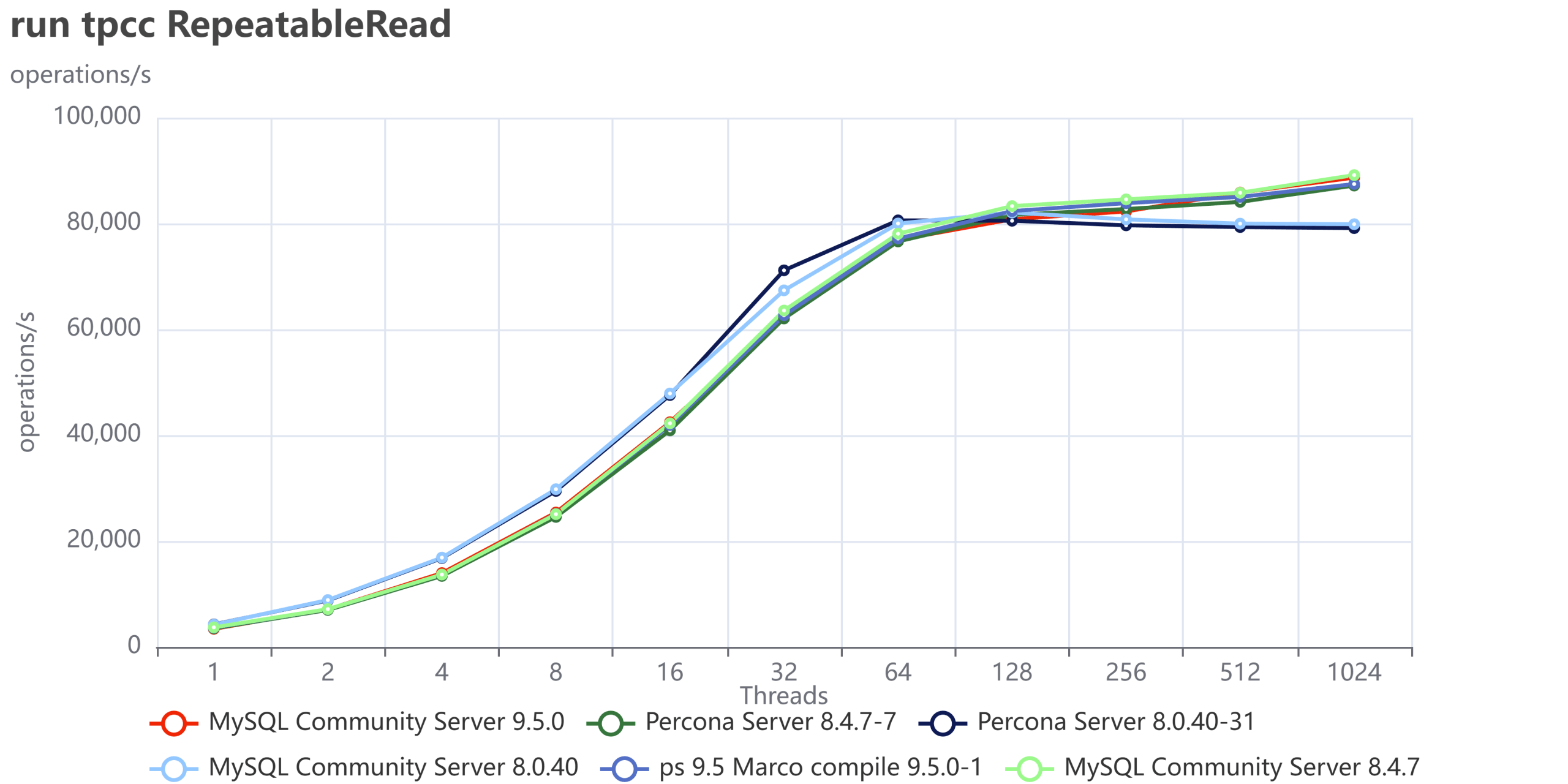
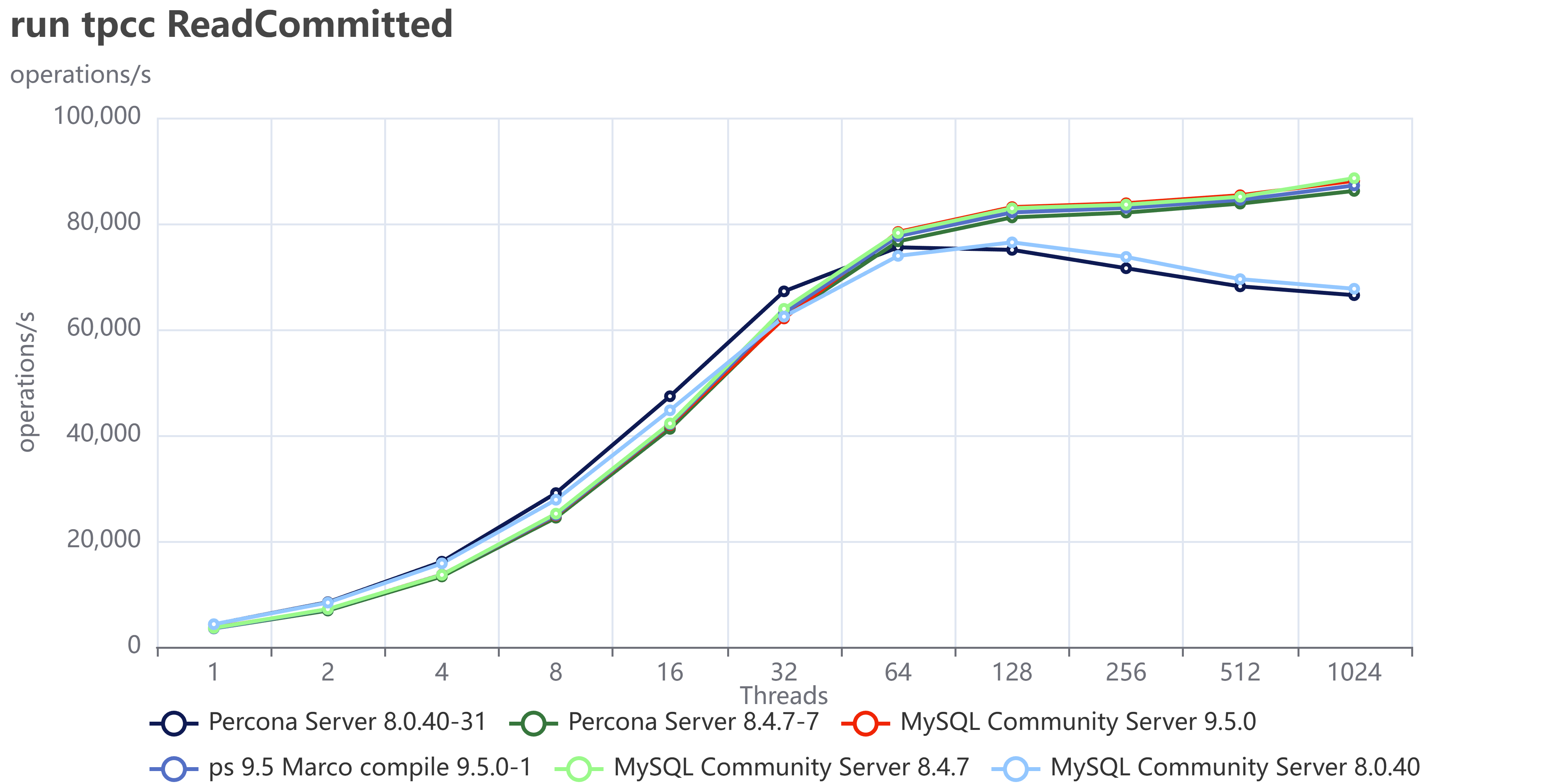
As usual an image is more descriptive than many words:

run tpcc ReadCommitted 8 9

run tpcc ReadCommitted 8 9

You can also compare these trends (not the values) with the previous results published here.

Let us comment a bit on these images. 


The first comment we should make is that nowadays our systems must be ready to scale; period, no discussion. Also, doing benchmarks up to 1024 threads is not enough. In the real world we have 4000 or more connections. Given that, doing benchmarking exercises and stopping the load at 128 threads or lower, makes no sense. 

This is going to be very clear in the next section. For now, what we can notice is that Percona Server and MySQL community are very close in terms of performance. The minor difference is inside the %variance so it is not relevant. This is expected given we share a large part of the code. What is relevant here is that Percona Server comes with similar/same performance and is a more feature-rich version, given that Percona Server MySQL has features that exist only in MySQL Enterprise.  


The second comment is that in previous tests, MySQL had not only stabilized the server behavior, but it has also done significant fixes to prevent the performance loss while scaling.

Now what we can see is that the newer versions are able to keep on with the traffic and are able to scale a bit more. So, in short, everything seems going good, or at least much better than before. 


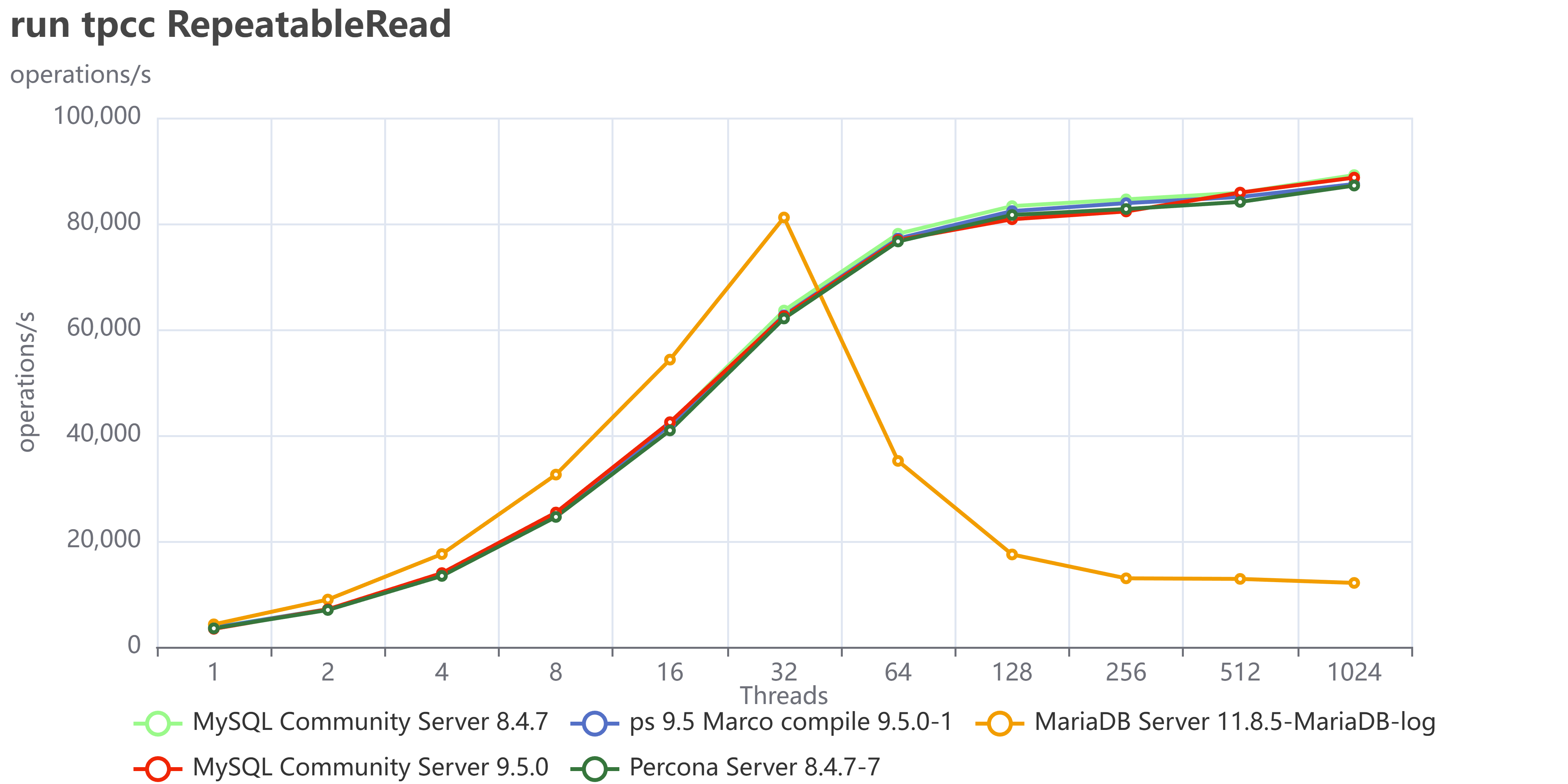
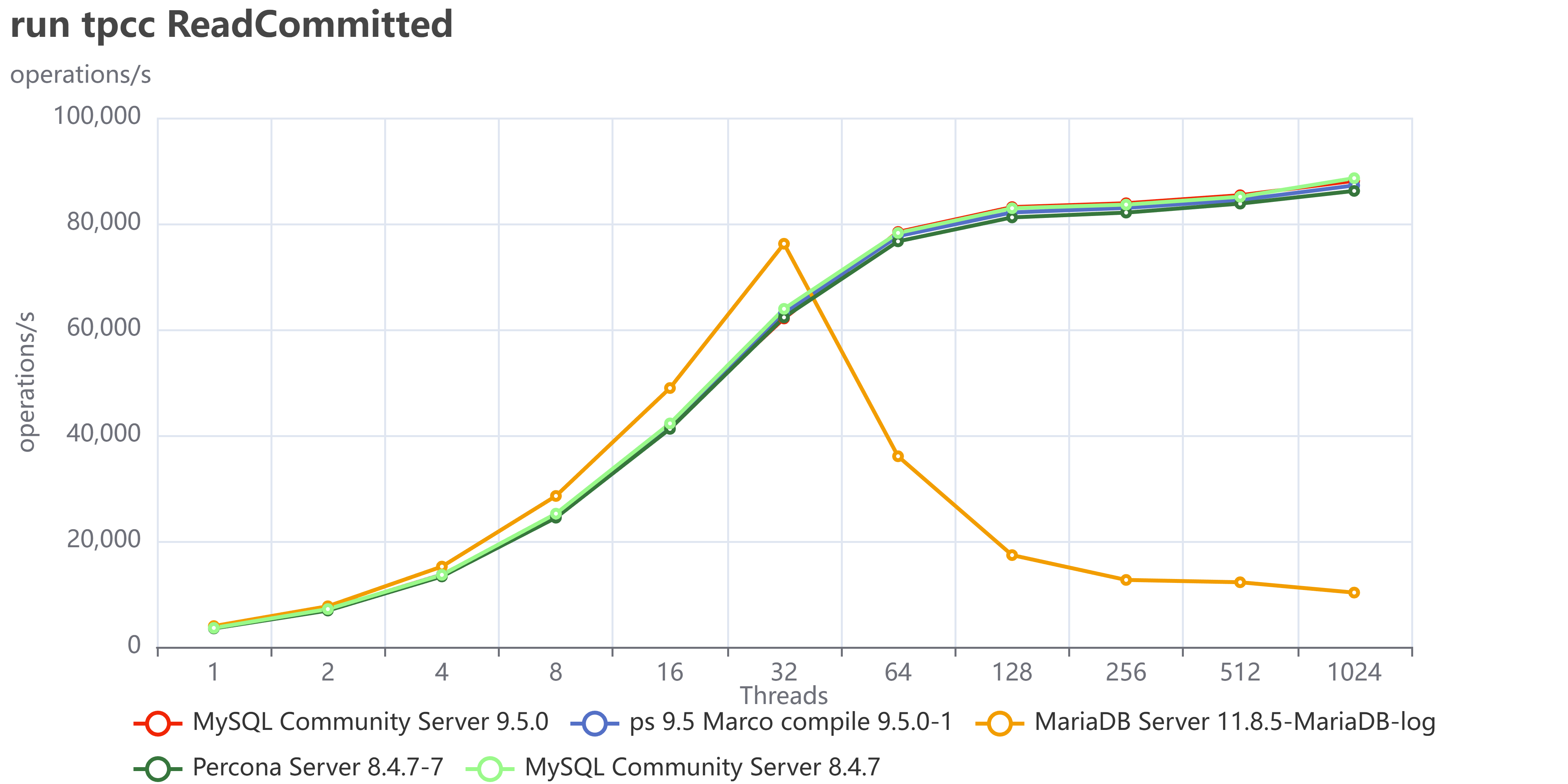
Let us now add MariaDB 11.8.5 and stay focused on MySQL/Percona 8.4 and 9.5

run tpcc RepeatableRead

run tpcc ReadCommitted

This doesn’t look very good, right? What it seems is that MariaDB is doing great up to 32 threads, then just stops and cannot serve traffic. 

Restricting the concurrency to a maximum of 32 threads would have prevented the observation of MariaDB's saturation point, thereby yielding inaccurate test results and erroneous conclusions. This is why I am always first trying to identify the saturation point, then scale the tests.   


Why did we have that? We need to keep in mind that in TPC-C like tests execute a lot of reads and writes 50/50 inside the same transaction and as concurrent operations, better reflecting the reality of what happens on a busy system. 

In any case, I was really puzzled by this MariaDB behavior, which seems very weird to me. So I decided to also run all the sysbench tests I have and see what happens (to see the full results, see this.) 

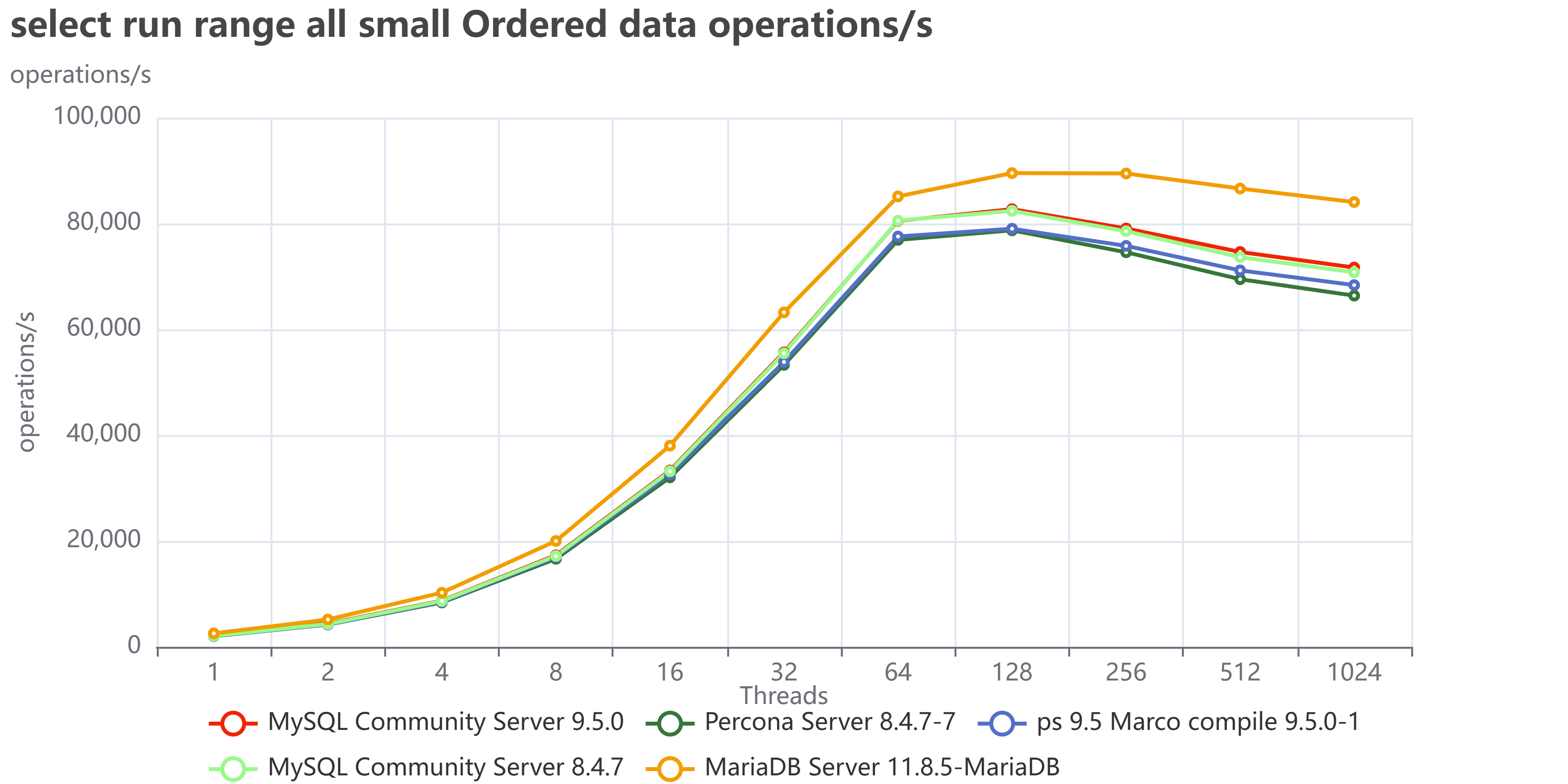
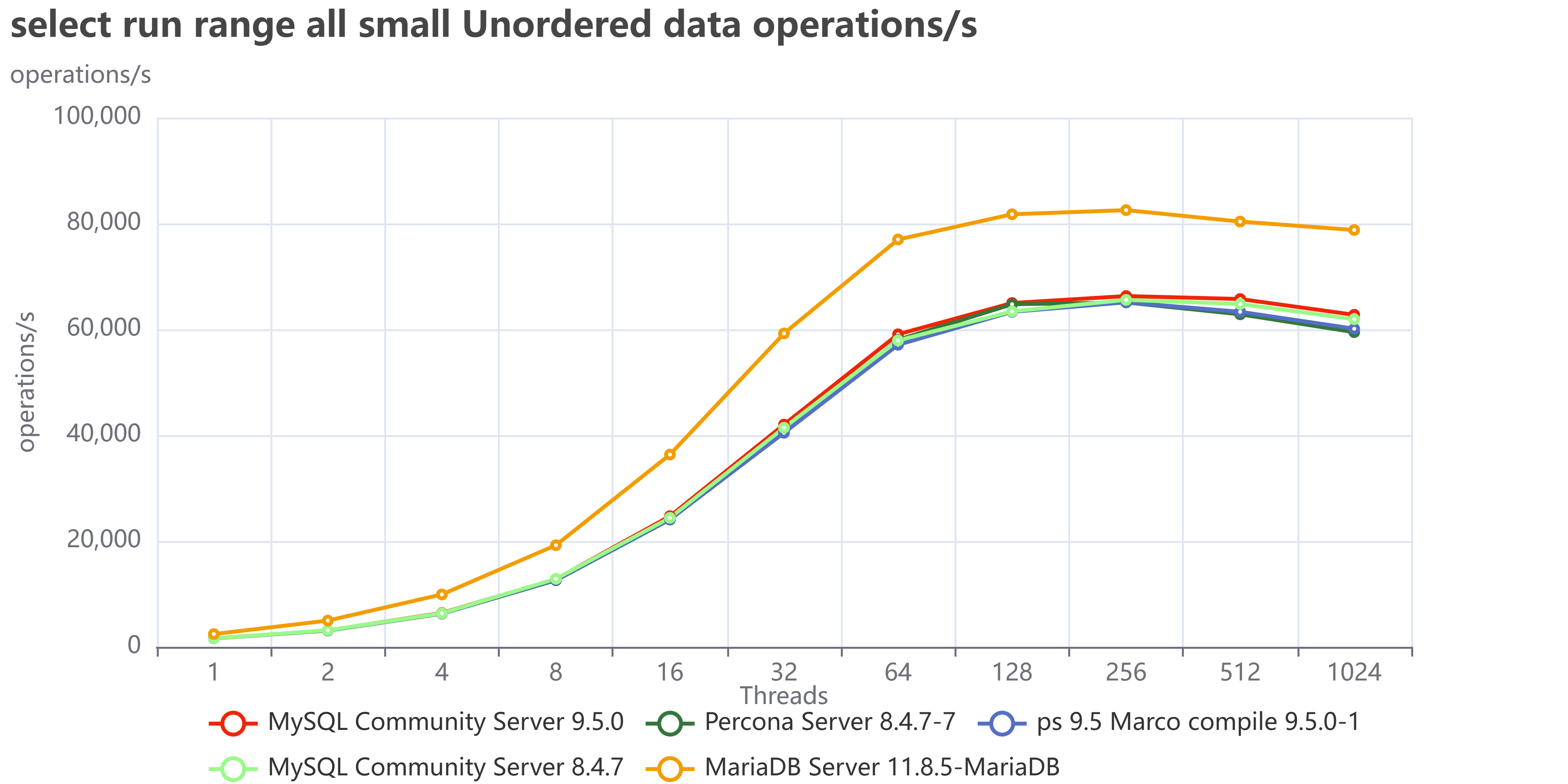
What comes up from this exercise is a different scenario. Executing isolated tests, MariaDB is doing great and often surpassing MySQL or Percona server in reads.
Let us see some examples like the range tests all, where I execute all the range tests:

select run range all small Ordered data operations s

select run range all small Unordered data operations s


As we can see MariaDB is performing great and in the case of unordered pages is less affected than MySQL/Percona. 

And this is the trend for all reads. What about the writes then?

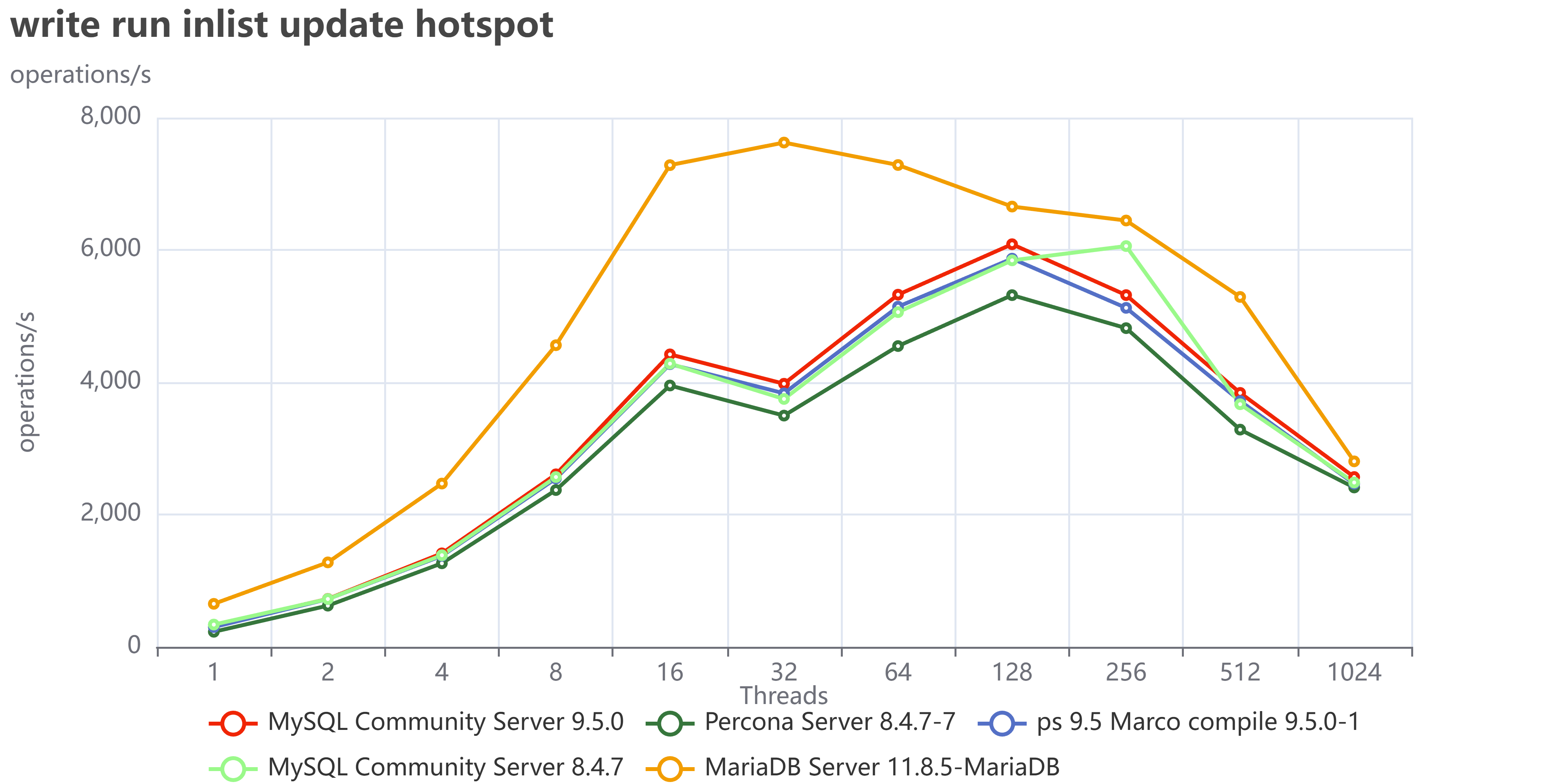
Well in some cases like when we have in list update with hotspot MariaDB it is still doing good:

write run inlist update hotspot

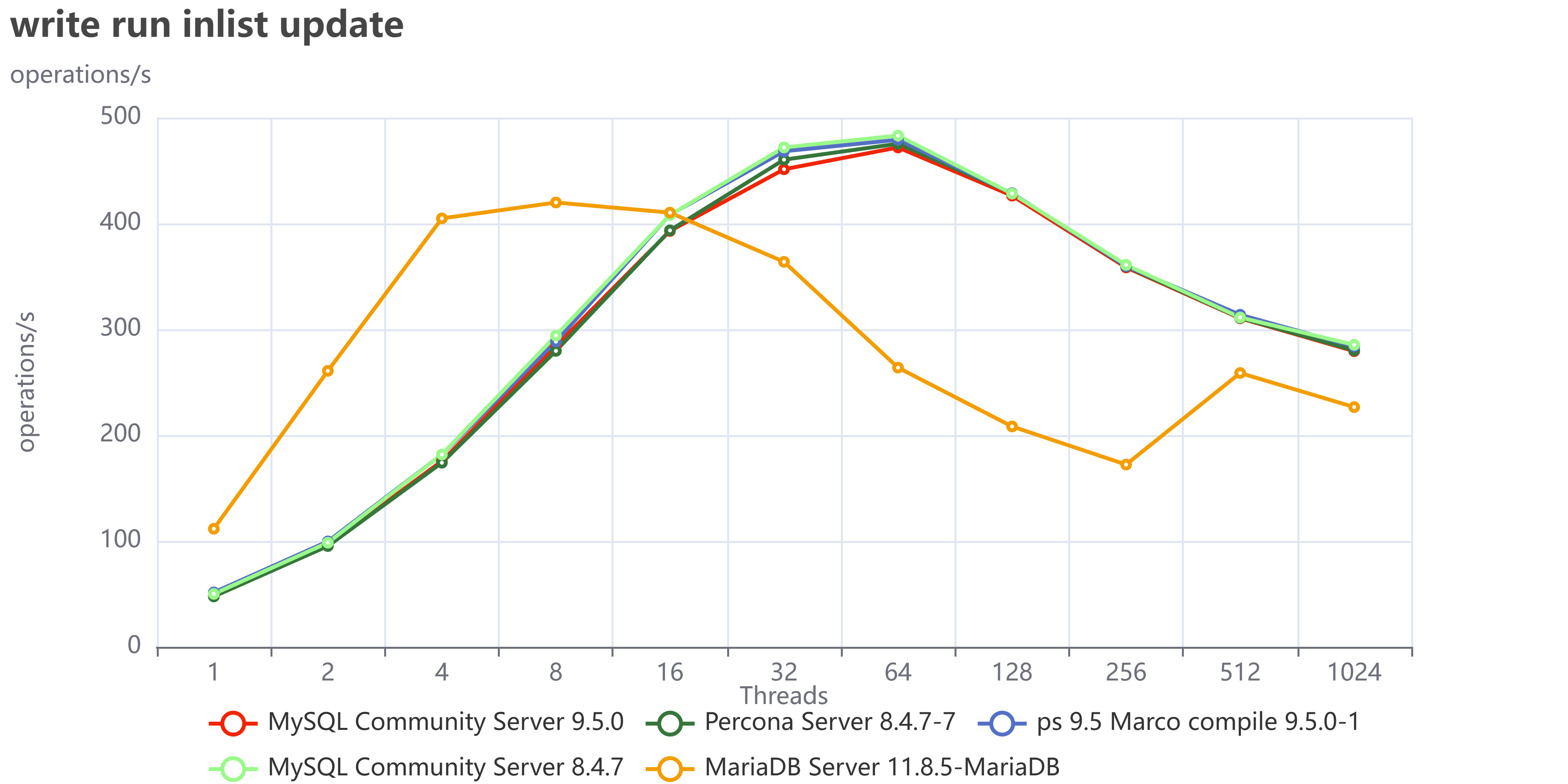
But if we do not have hotspots, when the writes are distributed across the whole dataset:

write run inlist update

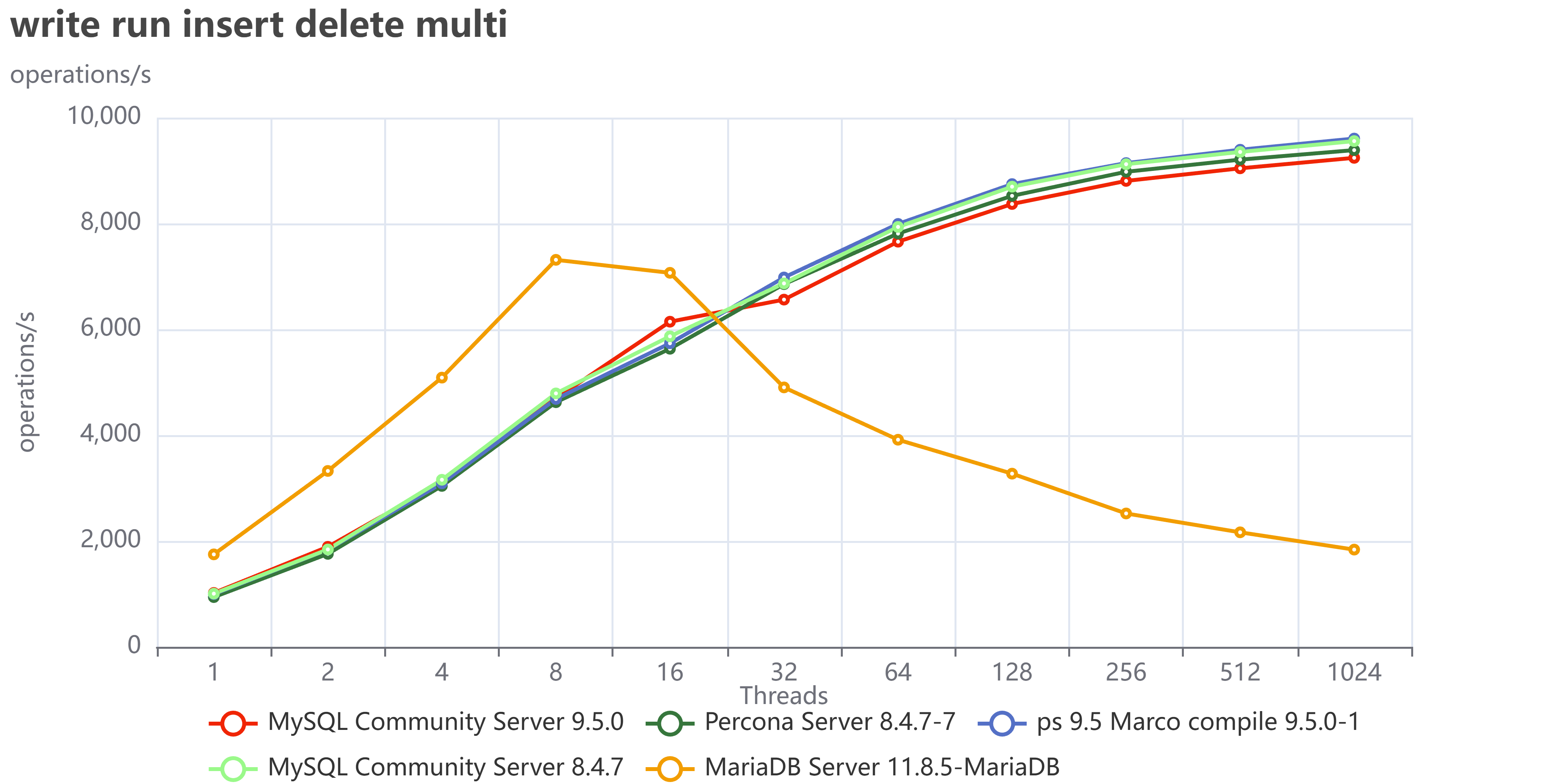
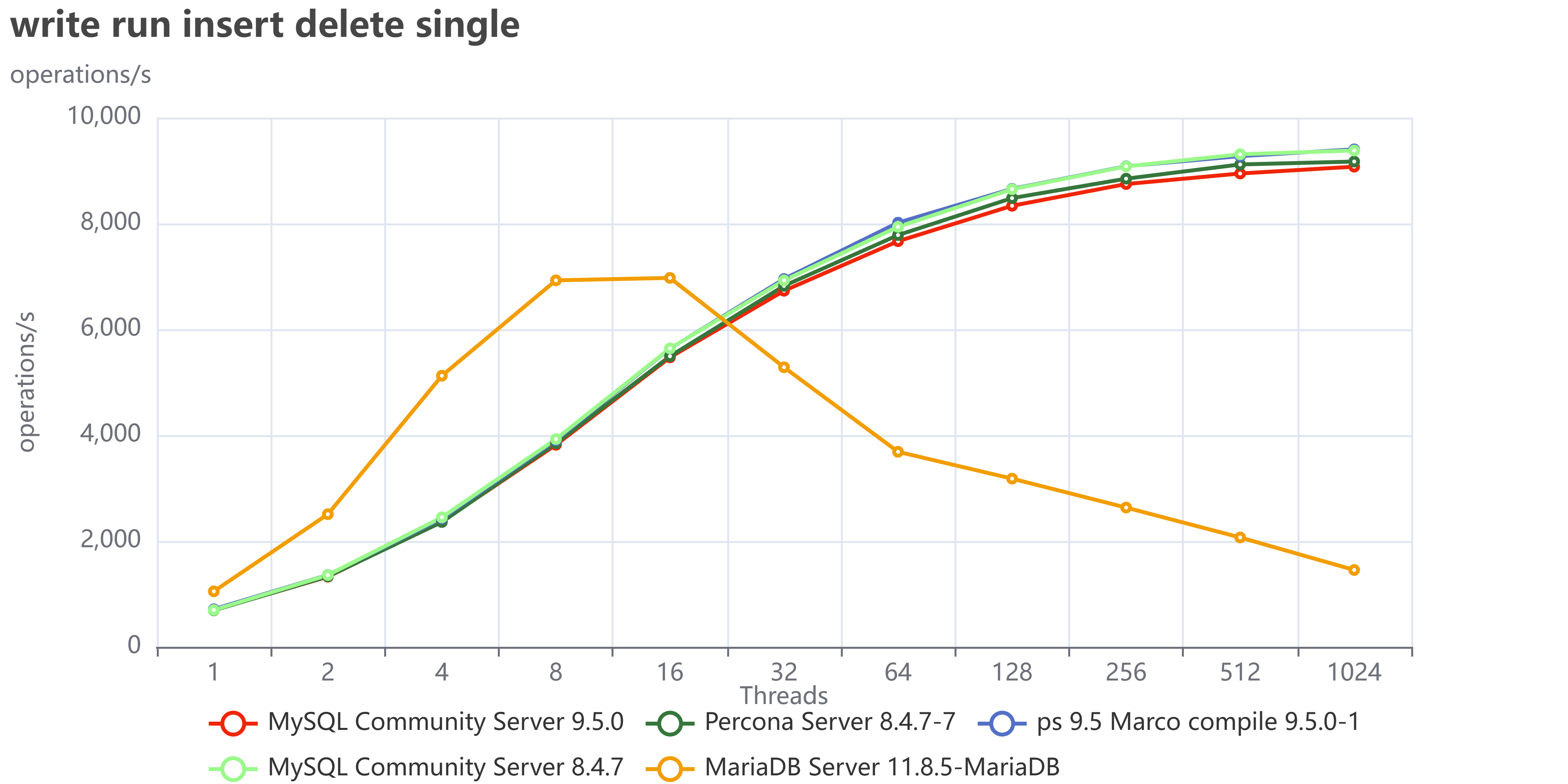
This is even clearer when using insert/delete:

write run insert delete multi

write run insert delete single

Finally, if we collect the tests that execute read/write operations:

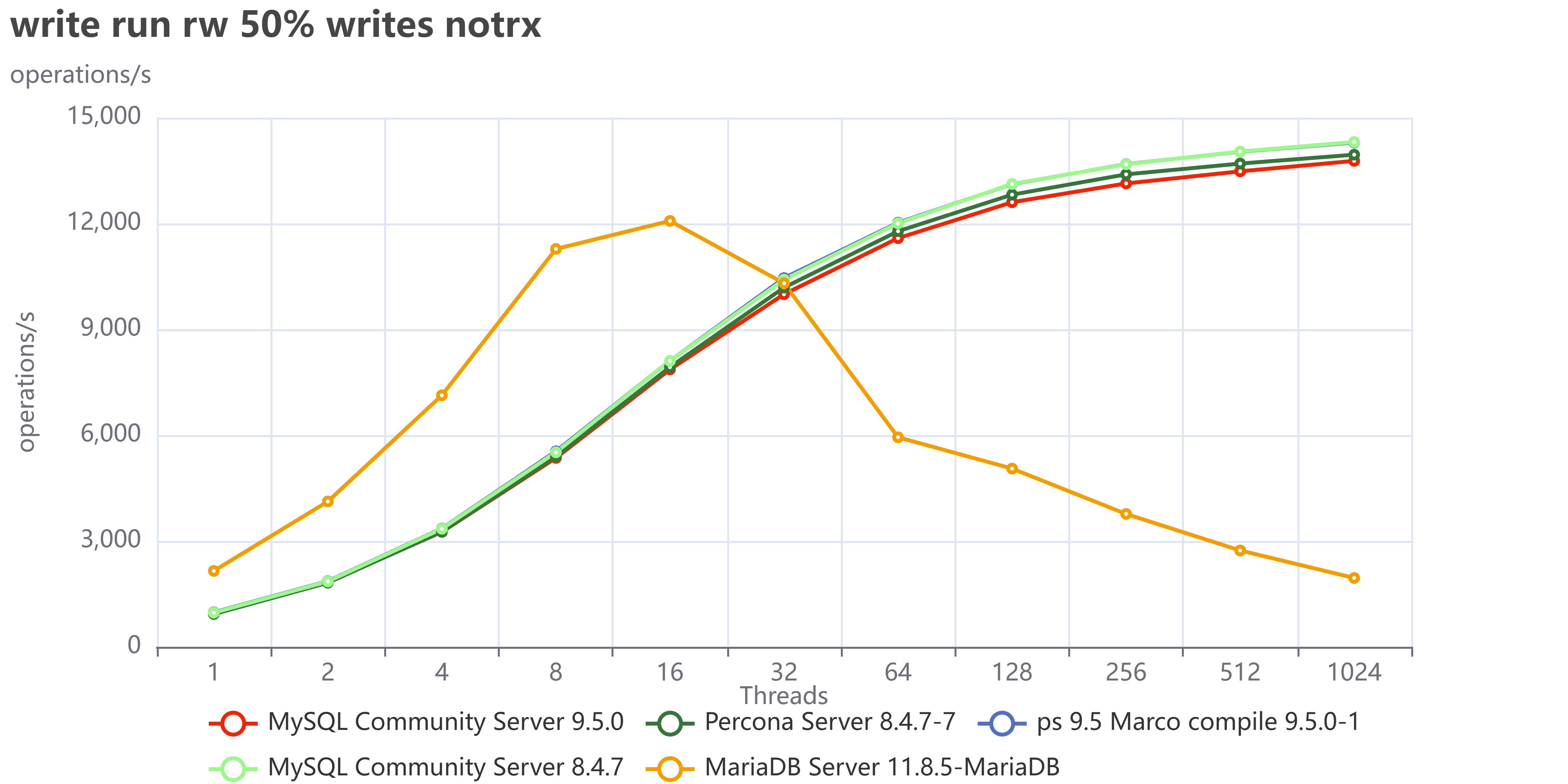
write run rw 50 writes notrx

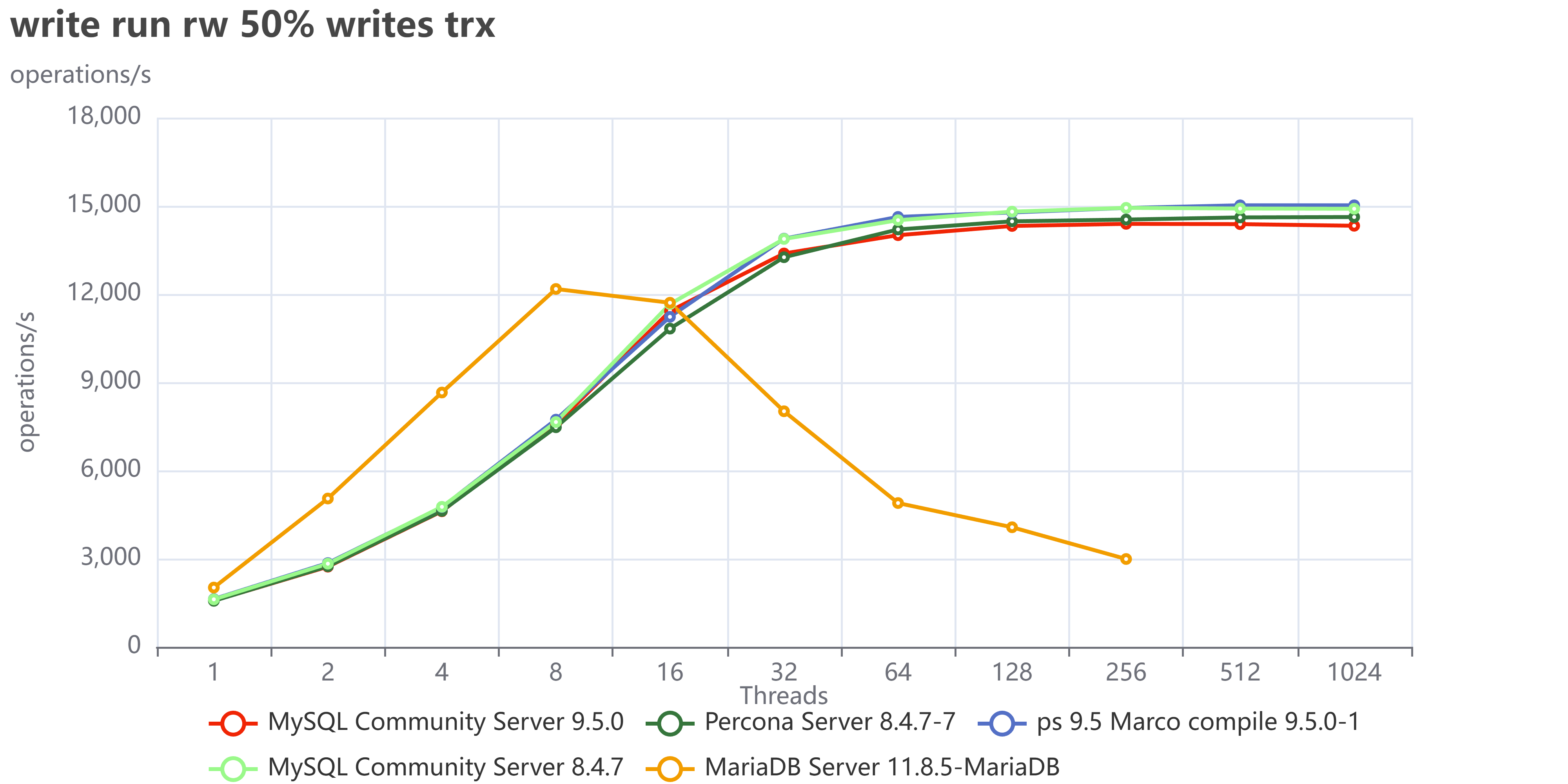
write run rw 50 writes trx


We can see we have a very similar behavior as we had with TPC-C tests. 

I did not investigate in detail what is causing MariaDB to fail so much in write operations, but my gut tells me to point toward the InnoDB Buffer pool restructuring they had done, which is probably also the reason why MariaDB is doing better in reads. I am obviously open to collaborate with any MariaDB folk that would like to tune and test again, just ping me.

If you want to browse all tests go: here for tpcc

Conclusions

The tests performed using TPC-C like tests confirm that the MySQL debacle should be over. At the same time, they indicate that the race to get better performance is open again, and I am intrigued to see what will come next, hoping we will see Percona sprint again and add a significant performance gain, not only enterprise features.

For now, MySQL/Percona 9.5 confirms to be the better performing MySQL version currently available, for its stability and scalability. 

I also think we should investigate a bit more on MariaDB implementation and identify what is making that solution operating much better in reads and acting so poorly for writes. For sure, we are not in the LAMP era anymore, when the majority of operations were read. Nowadays, the standard load and utilization on a DB sees read/write operations executed with a high level of threads, so a behavior like the one MariaDB has is not acceptable. But I am sure that if they investigate and focus on that, they will be able to identify the bottleneck and fix it.

Finally, I can't wait to see this product become even better. I truly hope that our push for the community to step up and take charge yields the results we're aiming for.


In the meanwhile, have a great MySQL (and MariaDB)!

No comments on “MySQL January 2026 Performance review”

How to Set Up the Development Environment for MySQL Shell Plugins for Python

Details
Super User
MySQL
27 February 2025

MySQL Shell is a powerful tool for managing MySQL databases, and one of its most exciting features is the ability to extend its functionality using plugins. If you're a Python developer, you can create custom plugins to automate tasks, add new commands, ordolphin programming
integrate MySQL Shell with other tools. However debugging the python code could be cumbersome for mysql-shell given the python code requires some specific objects available only when running inside the shell. 

In this blog post, we'll walk you through the steps to set up your development environment for creating MySQL Shell plugins in Python while able to modify and debug the mysql-shell itself.

Prerequisites

Before we dive into the setup, ensure you have the following installed on your system:


  • MySQL Shell: Download and install MySQL Shell from the official MySQL website.
  • Python 3.8 or later: MySQL Shell plugins require Python 3.8+. You can download Python from python.org.
  • A code editor: Use your favorite code editor, such as VS Code
  • Git: Optional, but useful for version control.


A directory structure as follow:

mysql_source/
├── boost
├── mysql-8.4.4  <-- directory where we compile the mysql server 
├── mysql-server <-- directory with the source code (from git or package)
├── mysql-shell  <-- directory with the mysql-shell code from git
├── mysql-shell-build-vs <-- directory where we build using Visual Studio
└── mysql-shell-plugins  <-- directory with the example plugin 


Step 1: Collect and compile MySQL server code

If you want to clone the MySQL repository:

git clone https://github.com/mysql/mysql-server.git

git fetch

git checkout tags/mysql-8.4.4 -b mysql-8.4.4 


Or just download the source code from the website for that specific release:

curl https://dev.mysql.com/get/Downloads/MySQL-8.4/mysql-8.4.4.tar.gz - o mysql-8.4.4.tar.gz


In both cases once you have the code locally we need to configure and build the libraries.

For more information about how to compile and dependencies check here


Then we go inside the compile directory (mysql-8.4.4) and configure it:

cmake /<path>/mysql_source/mysql-server -DCMAKE_INSTALL_PREFIX=/<path>/mysql_templates/mysql-8.4.4 -DWITH_DEBUG=1 -Dprotobuf_BUILD_SHARED_LIBS=ON


And we compile the needed libraries:

  cmake --build . --target mysqlclient

  cmake --build . --target mysqlxclient


There is no need to compile the whole server, unless you really want to. 


Step 2: Collect and compile MySQL Shell code

Once the server libs are prepared then go for mysql-shell.

Get the code:

git clone https://github.com/mysql/mysql-server.git

git fetch

git checkout tags/8.4.4 -b 8.4.4


Now my advice is to always do a compilation outside the code editor to be sure we have all the needed components, for more info check here


To configure:

cmake /<path>/mysql_source/mysql-shell -DMYSQL_SOURCE_DIR=/<path>/mysql_source/mysql-server/ -DMYSQL_BUILD_DIR=/<path>/mysql_source/mysql-8.4.4 -DHAVE_PYTHON=1 -DHAVE_V8=0 -DWITH_TESTS=1 -DCMAKE_BUILD_TYPE=Debug -DCMAKE_INSTALL_PREFIX=/<path>/mysql_source/mysql_shell_bin 


If all went well you can check if the mysql-shell works properly running it from the destination path (in the example) /opt/mysql_source/mysql_shell_bin/bin/mysqlsh 

Step 3: Set Up a Python Virtual Environment

To avoid conflicts with other Python projects, it's a good idea to create a virtual environment for your MySQL Shell plugin development.

Open your terminal and navigate to your project directory.

Create a virtual environment:

python -m venv mysqlsh-plugin-env

Activate the virtual environment:


On macOS/Linux:

source mysqlsh-plugin-env/bin/activate


Verify that the virtual environment is active. Your terminal prompt should now show the name of the virtual environment.


Step 4: For lazy people (as myself) download and use existing plugin demos.

Our dear friend Lefred has built a very nice suite that I normally use as a starting point.

Get the code, go to your mysql_source directory and:

git clone https://github.com/lefred/mysqlshell-plugins.git 


In mysql-shell at the moment you can load the plugin at startup only if they are located in the sub-directory ~/.mysqlsh/plugins or where the lib/mysqlsh/plugins is located. See FR here for a more convenient way to dynamically pass the path to browse. 

Anyhow for now and the purpose of this blog let us use a a trick and create a symlink:

mkdir ~/.mysqlsh/plugins

ln -s <path>/mysql_source/mysql-shell-plugins/demo ~/.mysqlshell/plugins/demo


Ok now our code side is set. 

Download and configure VisualStudio.

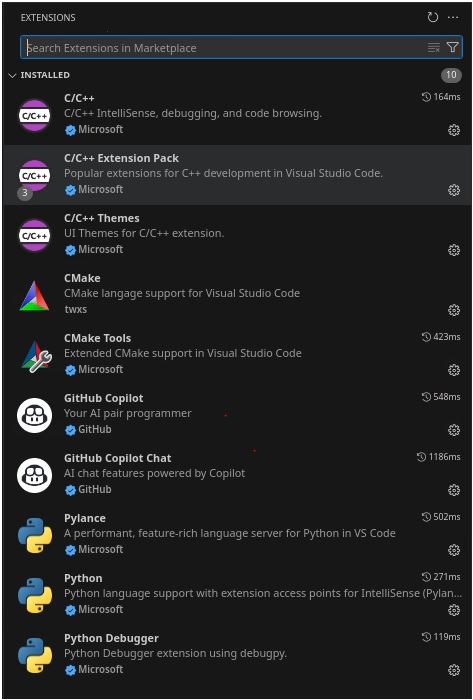
Add few extension, mine are the following:

1


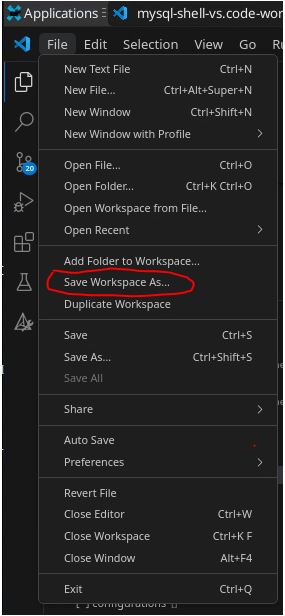
Then open the directory where you have clone the mysql-shell code inside VS and save it as workspace:

2


Then click again on the File and add Folder to workspace and add mysql-shell-plugin/demo directory. 


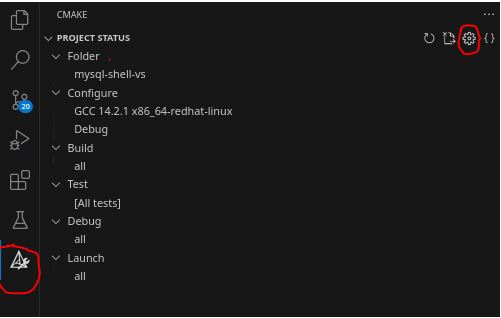
Now we need to configure the cmake side of the project:

3


Click on the icon on the left first then on the settings wheel to open the specific menu. 

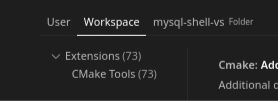
I suggest you to change things at workspace level choosing the workspace tab:

4


Look for the Cmake: Build Directory option and set it to /<add full path>/mysql_source/mysql-shell-build-vs as outlined before. 

Then look for the Cmake: Configure Settings option and click on edit settings.json and set as follow:
"cmake.configureSettings": {

"MYSQL_SOURCE_DIR":"/<add full path>/mysql_source/mysql-server/",

"MYSQL_BUILD_DIR":"/<add full path>/mysql_source/mysql-8.4.4",

"HAVE_PYTHON":true,

"BUNDLED_POLYGLOT_DIR":0,

"WITH_TESTS":true,

"CMAKE_BUILD_TYPE":"Debug",

},

The above will create the Cmake configuration and structure in /<add full path>/mysql_source/mysql-shell-build-vs. 


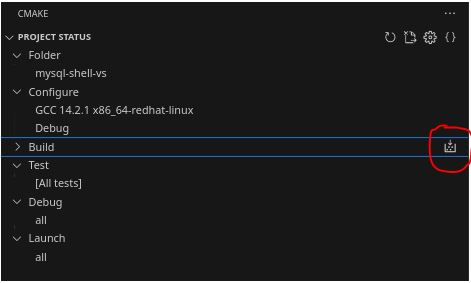
Once this is done compile the project clicking on the small icon close to build

5

This will build the whole project, sit down and relax while compilation will complete. 


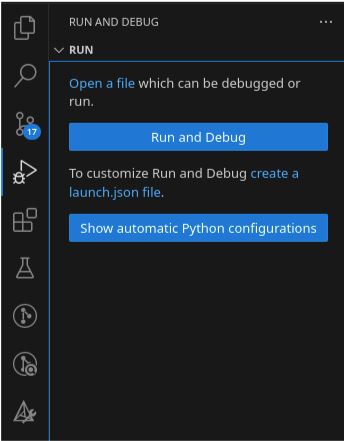
Once this is complete click on the run-and-debug  icon:
6

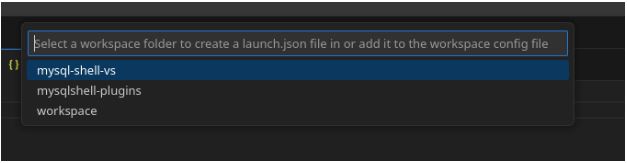
Then click on create a launch.json

Choose mysql-shell-vs:

7


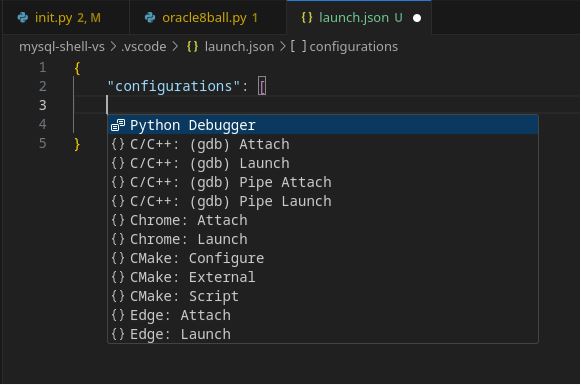
8

Then pick C/C++ gdb Attach.

This will open a json file, we are interested in the values inside the “configurations”, it should be something like this:
      {

            "name": "(gdb) Launch",

            "type": "cppdbg",

            "request": "launch",

            "program": "/<add full path>/mysql_source/mysql-shell-build-vs/bin/mysqlsh",

            "args": [

                "--verbose=1"

            ],

            "stopAtEntry": false,

            "cwd": "/<add full path>/mysql_source/mysql-shell-build-vs/",

            "environment": [{"name": "PYTHONPATH", "value": "PATH to your python directory"}],

            "externalConsole": false,

            "MIMode": "gdb",

            "setupCommands": [

                {

                    "description": "Enable pretty-printing for gdb",

                    "text": "-enable-pretty-printing",

                    "ignoreFailures": true

                },

                {

                    "description": "Set Disassembly Flavor to Intel",

                    "text": "-gdb-set disassembly-flavor intel",

                    "ignoreFailures": true

                }

            ]

        }

After that you need to add the Python debugger information:

      {

            "name": "plugin-p",

            "type": "debugpy",

            "request": "attach",

            "connect": {

                "host": "localhost",

                "port": 5678

            },

            "pathMappings": [

                {

                    "localRoot": "${workspaceFolder}",

                    "remoteRoot": "."

                }

            ],

            "justMyCode": false

        },

As you can see what we will do is to attach the debugger to a process that will spin up inside the code.


Save the file, and in the left panel you will now have the option to run and debug using both debuggers. 

Before running the debug let us do a couple of more things.

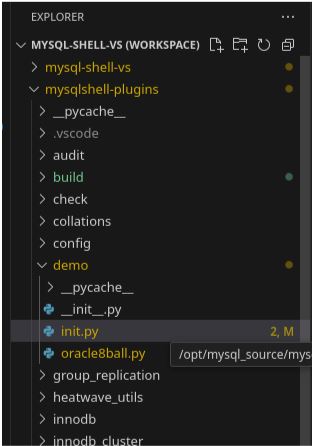
Click on the project explorer and open the init.py file in the demo directory 


9


Before the instruction: import mysqlsh, add this text:

import debugpy

debugpy.listen(("localhost", 5678))

print("Waiting for debugger attach...")

debugpy.wait_for_client()

print("Debugger attached.")

If the module debugpy is not installed do it with:

pip install debugpy

Then before the last line add:

import mysqlsh

shell = mysqlsh.globals.shell


This to create the shell object that is available only internally to the mysql-shell.


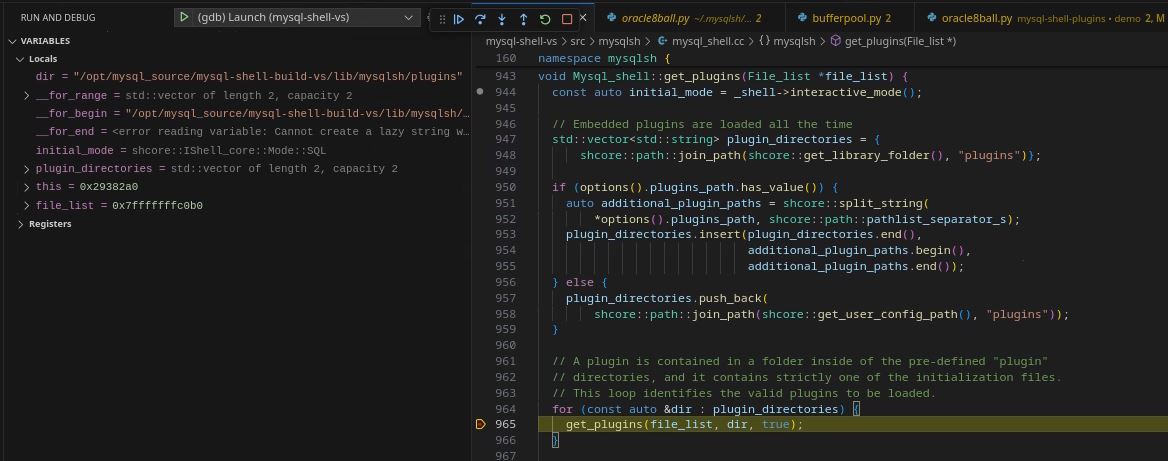
Now let us add a couple of breakpoints one in the mysql-shell code and another inside the python code.

In mysql_shell.cc look for:

  for (const auto &dir : plugin_directories) {

    get_plugins(file_list, dir, true);

  }

In mysql-shell 8.4.4 is at line 964.

Put a breakpoint on get_plugins

Then open oracle8ball.py and put a breakpoint on the last line:

 print(answers[index]) 


Run the C/C++ debugger… 

The execution will stop and in the debug left panel you will see the variable informations plus the debug toolbar:

10

This is standard debug for C/C++ projects … Let us click to proceed.

Execution will continue until loading the plugins then will stop. It will hang because the line we have inserted:

debugpy.wait_for_client()


Now run the Python debugger it will connect to the dbugger we defined in the code allowing the process to continue.

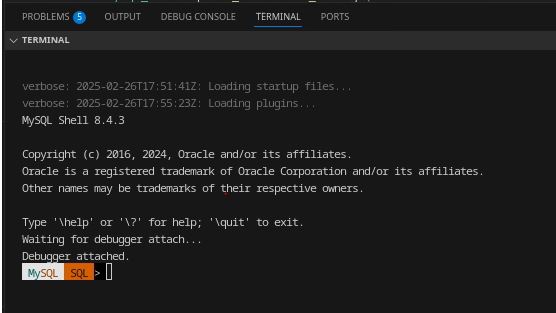
In the terminal window the mysql-shell prompt will appear but not only:

10 1

We can see that the python debugger is now also attached. 


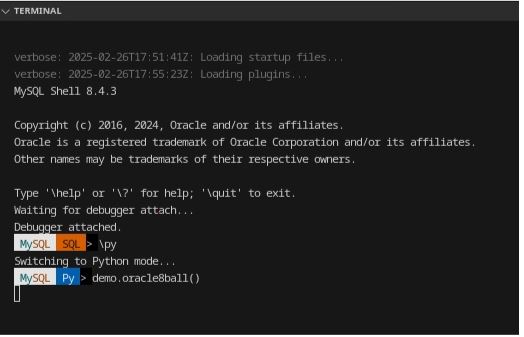
Let us move to python and execute the demo.oracle8ball()

10 2


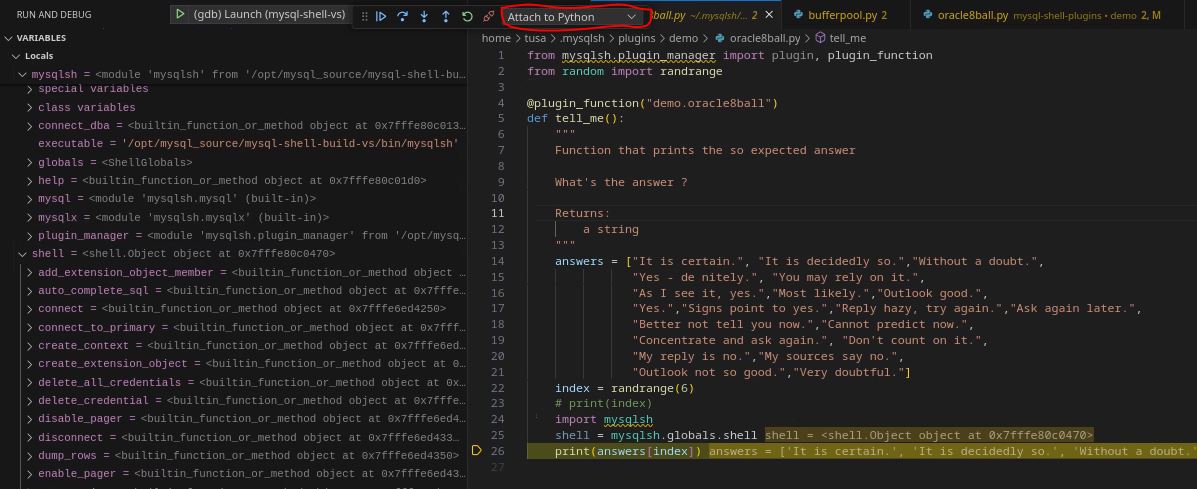
Execution is suspended and our debugger stop at our breakpoint:

11


Please note two things, the first is that also in this case we can see the whole set of information related to local and global variables including the shell object and the other is that the debugger menu shows that now the navigation button refers to the python debugger. 


This level of integration will give anyone a more friendly environment where to develop your mysql-shell extensions. This is particularly important for the ones who wish to standardize and simplify the DBA operation or to give developers easy access to independently and safely perform actions on the databases. 
Tips for Developing MySQL Shell Plugins

Use the MySQL Shell API: MySQL Shell provides a rich API for interacting with MySQL databases. Refer to the official documentation for details.

  • Test Incrementally: Test your plugin functions frequently to catch errors early.
  • Leverage Python Libraries: You can use any Python library in your plugin, so take advantage of the vast Python ecosystem.

Conclusion

Setting up a development environment for MySQL Shell plugins in Python is straightforward. With the right tools and a bit of Python knowledge, you can create powerful extensions to enhance MySQL Shell's functionality. Whether you're automating database tasks or integrating with other systems, MySQL Shell plugins offer endless possibilities.


Happy coding!


No comments on “How to Set Up the Development Environment for MySQL Shell Plugins for Python”

MySQL latest performance review

Details
Super User
MySQL
28 January 2025

This article is focused on describing the latest performance benchmarking executed on the latest release of MySQL and Percona. dolphin jumping outside

In this set of tests I have used the machine described here.  

Assumptions

There are many ways to run tests, and we know that results may vary depending on how you play with many factors, like the environment or the MySQL server settings. However, if we compare several versions of the same product on the same platform, it is logical to assume that all the versions will have the same “chance” to behave well or badly unless we change the MySQL server settings. 

Because of this, I ran the tests changing only things in a consistent way, with the intent to give the same opportunity to each solution., with the clear assumption that if you release your product based on the defaults, that implies you had tested with them and consider them the safest for generic use. 

I also applied some modifications and ran the tests again to see how optimization would impact performance. 

What tests do we run?

High level, I run one set of test:

  • TPC-C (https://www.tpc.org/tpcc/) like 

The full methodology and test details can be found here, while actual commands are available:

  • Sysbench
  • TPC-C 


Why do I only run TPC-C tests?  

Well I am, normally, more interested in testing scenarios that are closer to reality than a single function test as we normally do with sysbench. 

This is it, while it is not possible to get the perfect benchmark test fitting all real usage, we need to keep in mind the rule of 80%. 

If you use MYSQL/InnoDB I expect that you have an OLTP kind of traffic, more than Key/Value or else. Given that while testing the single function, as we do with sysbench, may be useful to identify regression points or so. To get the wide scenario, TPC-C is a better way to go, given it implies not only a more intense write load, TPC-C test is 50/50 r/w, but also a schema structure with relations, foreign keys and constraints. In short, it is closer to the common use of a relational database management system. 


Results

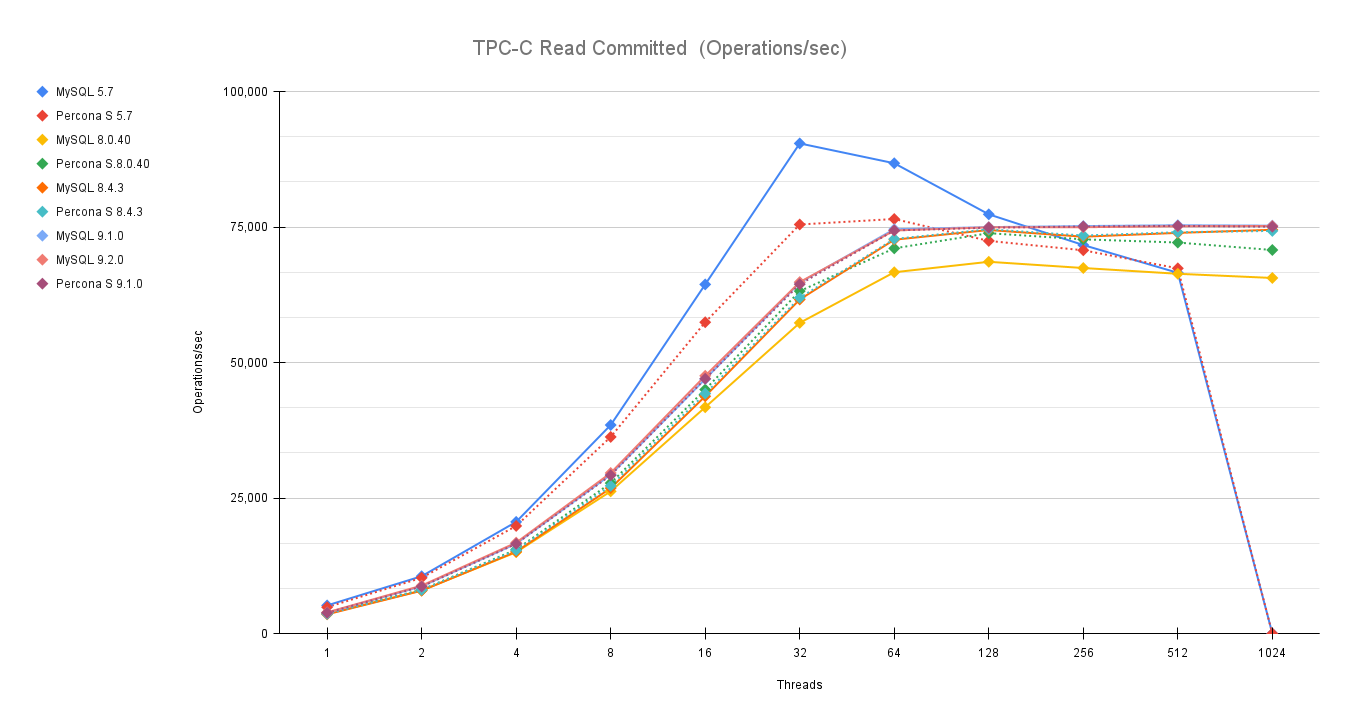
The tests done have two different kinds of isolation levels. Repeatable Read and Read Committed. The first is the default in MySQL/InnoDB, while the second is the default in many other very well known RDBMS. 


As usual an image is more descriptive than many words:

TPC C Read Committed Operations sec

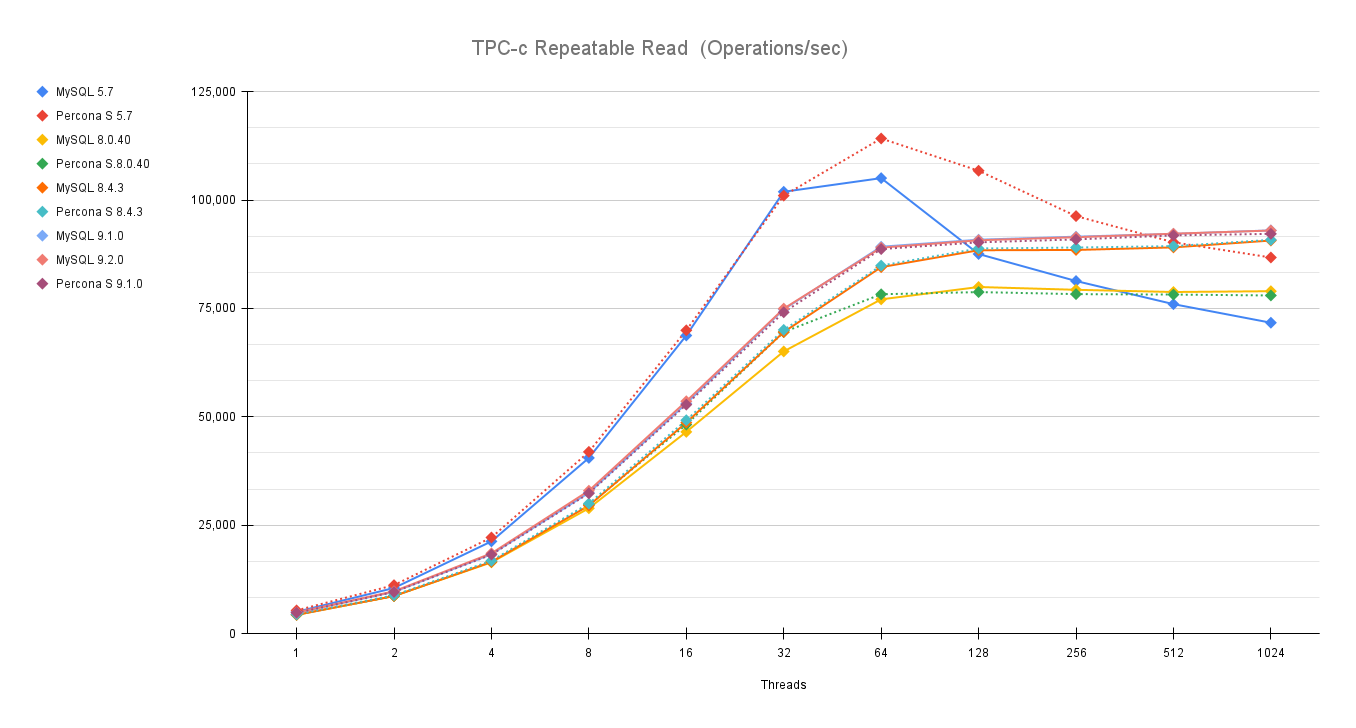
TPC c Repeatable Read Operations sec

You can also compare these trends (not the values) with the previous results published here.

Let us comment a bit on these images. 

The first comment we should make is that nowadays our systems must be ready to scale. Period, no discussion, also doing benchmarks up to 1024 threads is not enough. In reality we have 4000 or even more connections, given that doing benchmarking exercises and stopping the load at 128 threads or lower, makes no sense. Here it is quite clear that doing something like that could be very misleading. 

Old MySQL versions are still faster than newer with low level of concurrency, but they do not scale. So if I stop my tests at 64 or 128 threads I will conclude that MySQL 5.7 is always better than newer versions, while if I go on loading, I can see that old version performance drop after 64 concurrent threads. 


The second comment is that while in previous tests (see mentioned article) we saw that newer versions were not performing better or even consistently. With the latest releases MySQL had not only stabilized the server behaviour, but done significant fixes to the performance issues it had. 

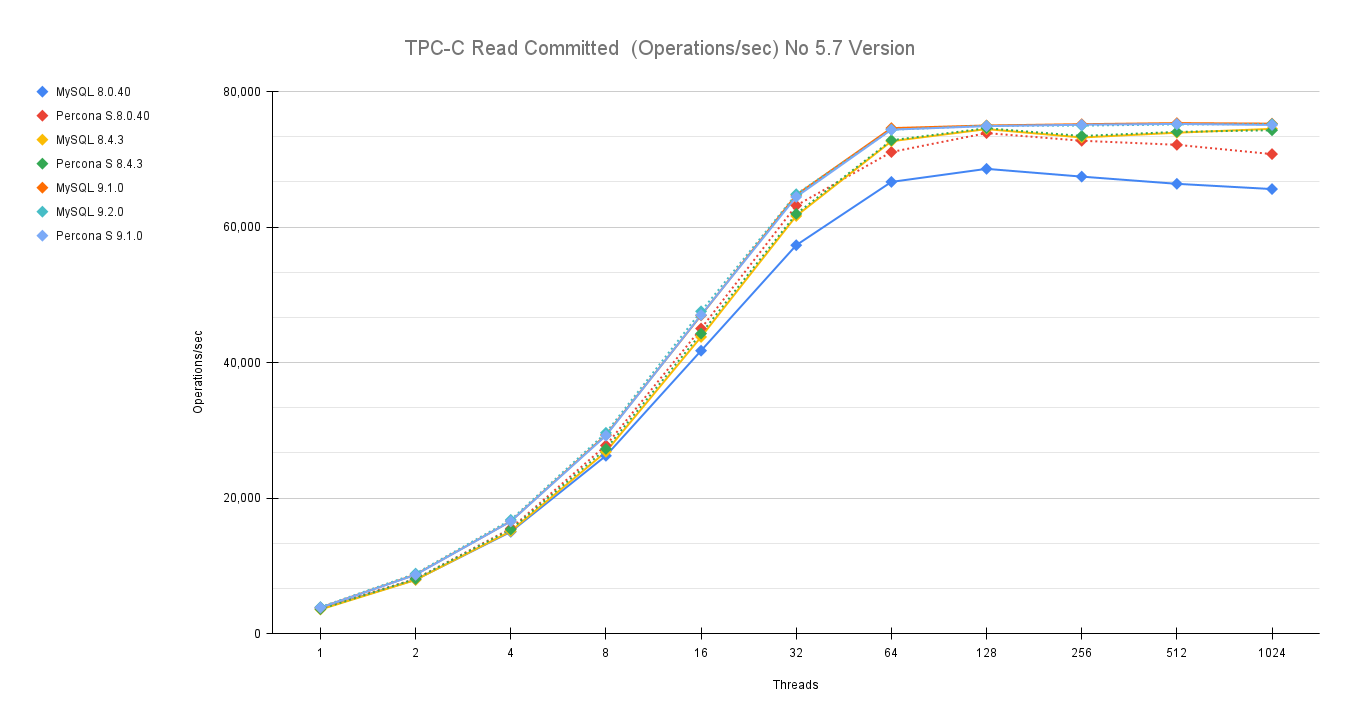
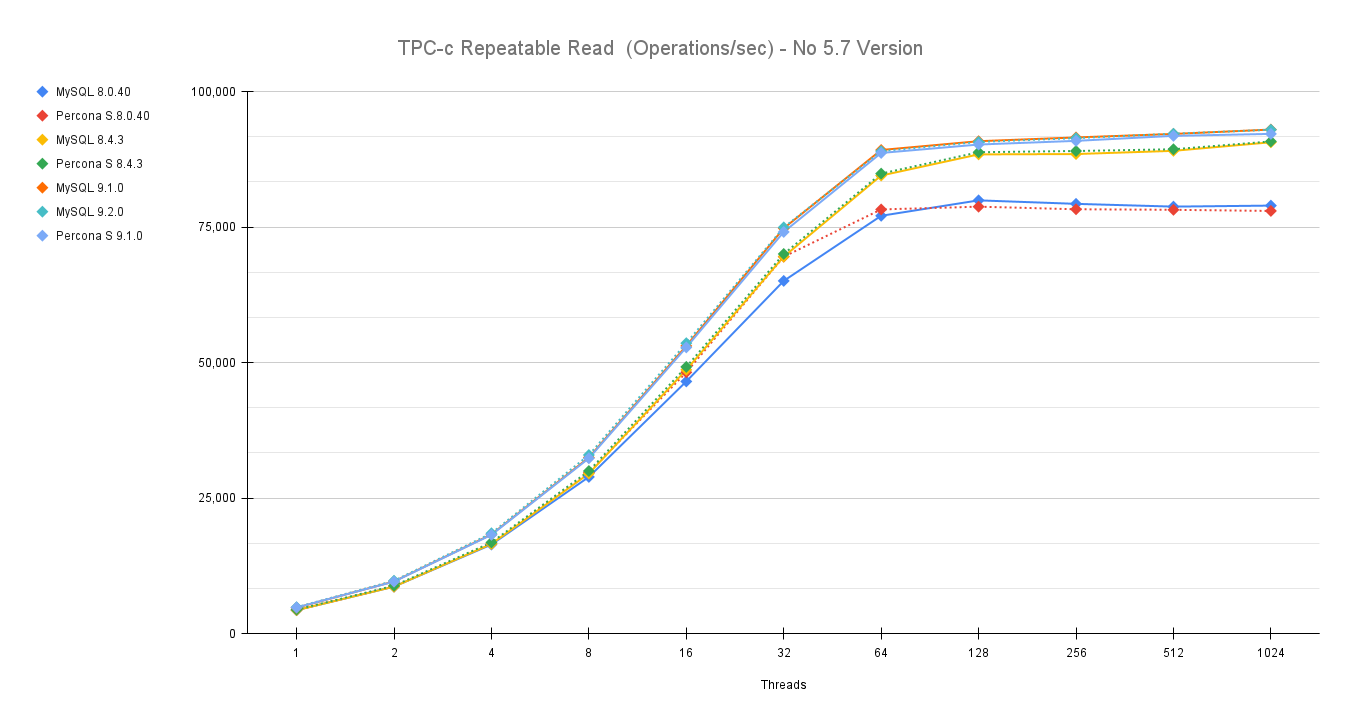
If we remove the 5.7 version from the graphs we can see clearer what is going on:

TPC C Read Committed Operations sec no57

TPC c Repeatable Read Operations sec no57

If you notice the servers lines after 32 threads and especially after 64 threads diverge and we have two groups one see Percona and MySQL 8.0.40 in the lower set while Percona and MySQL 8.4 and 9.x are in the upper group. 

This is quite great news and very nice to see, because if I have to read it in a way I see a positive sign indicating how Oracle/MySQL is progressively resolving some performance issues and gaining ground again. 

Conclusions

The tests performed using TPC-C like tests confirms the initial finding of my colleague here, and give us a picture that is more positive of what we had. At the same time they indicate that the race to get better performance is open again, and I am intrigued to see what will come next.

For now we can say that MySQL 9.2 is the better performing MySQL version currently available, for its stability and scalability. 

Great job!  

No comments on “MySQL latest performance review”

How to migrate a production database to Percona Everest (MySQL) using Clone

Details
Marco Tusa
MySQL
02 September 2024

The aim of this long article is to give you the instructions and tools to migrate your production database, from your current environment to a solution based on Percona Everest (MySQL).

Nice, you decided to test Percona Everest, and you found that it is the tool you were looking for to manage your private DBaaS. For sure the easiest part will be to run new environments to get better understanding and experience on how the solution works. However, the day when you will look to migrate your existing environments will come. What should you do?

Prepare a plan! In which the first step is to understand your current environment. 

 When I say understand the current environment, I mean that you need to have a clear understanding of:

  • the current dimensions (CPU/Memory/Disk utilization)
  • the way it is accessed by the application, what kind of query you have, is Read or Write intensive, do you have pure OLTP or also some analytic, any ELT processing
  • the way it is used, constant load or by time of the day or by day of the year? Do you have any peak ie: Black Friday 
  • what is the RPO/RTO, do you need a Disaster Recovery site? 
  • Who is accessing your database, and why. 
  • What MySQL version are you using, is it compatible with Percona Everest MySQL versions? 

Once you have all the information, it is time to perform a quick review if the solution could fit or not, for this step, given its complexity, I suggest you contact Percona and get help from our experts to take the right decision.   

From the above process you should come with few clear indications such as:

  • Needed resources
  • It is more read, write or 50/50
  • The level of recovery I need

The first thing to do is to calculate the optimal configuration. For this you can help yourself with the mysqloperatorcalculator. The tool will give you the most relevant variables to set for MySQL, configuration that you will be able to pass to Percona Everest while creating the new cluster.  

To install Percona Everest see here

Create the new cluster

It is now time to open our Percona Everest console and start the adventure.

everest1 a

In the basic information step, look at the supported versions for Database Server

everest2 a

This version and the source version must match to safely use the CLONE plugin. Note that you cannot clone between MySQL 8.0 and MySQL 8.4 but can clone within a series such as MySQL 8.0.37 and MySQL 8.0.42. Before 8.0.37, the point release number also had to match, so cloning the likes of 8.0.36 to 8.0.42 or vice-versa is not permitted

It is now time to set the resources, the value of them should come from the analysis previously performed.

everest3 a

Given that choose 1 (one) node, then Custom and feel the fields as appropriate.

everest4 a

In advance configuration add the IP(s) you want to allow to access the cluster. You must add the IP of the source, IE 18.23.4.12/32.  

In the set database engine parameters add the values (for MySQL only) that the mysqloperatorcalculator is giving you. Do not forget to have the mysqld section declaration.

For example, in our case I need to calculate the needed values for a MySQL server with 4 CPU 8GB ram serving OLTP load, once you have the mysqloperatorcalculator tool running:

$ curl -i -X GET -H "Content-Type: application/json" -d '{"output":"human","dbtype":"pxc", "dimension":  {"id": 999, "cpu":4000,"memory":"8G"}, "loadtype":  {"id": 3}, "connections": 300,"mysqlversion":{"major":8,"minor":0,"patch":36}}' http://127.0.0.1:8080/calculator

You will get a set of values that after cleanup looks like:

[mysqld]
    binlog_cache_size = 262144
    binlog_expire_logs_seconds = 604800
    binlog_format = ROW
… snip …
    loose_wsrep_sync_wait = 3
    loose_wsrep_trx_fragment_size = 1048576
    loose_wsrep_trx_fragment_unit = bytes

Add the text in the TEXTAREA for the database parameters.

everest5 a

Enable monitoring if you like then click on Create database.

Once ready you will have something like this:

everest6

Or from shell

$ kubectl get pxc
NAME         ENDPOINT   STATUS   PXC   PROXYSQL   HAPROXY   AGE
test-prod1   xxx        ready    1                1         2m49s

$ kubectl get pods
NAME                                              READY   STATUS    RESTARTS   AGE
percona-xtradb-cluster-operator-fb4cf7f9d-97rfs   1/1     Running   0          13d
test-prod1-haproxy-0                              3/3     Running   0          106s
test-prod1-pxc-0                                  2/2     Running   0          69s

We are now ready to continue our journey.

Align the system users

This is a very important step. Percona Everest use the Percona Operator who will create a set of system users in the database, and these users must be present also in the source with the same level of GRANTS, otherwise after the clone phase is terminated, the system will not work correctly. 

Keep in mind Percona Everest will create the users with some generated password, these passwords may or may not fit your company rules or be simply too crazy. Do not worry you will be able to change them. For now, let's see what the system has generated. 

everest8

To see how to access the cluster click on the “^” top right, it will expand the section. User is “root” now unhide the password… Ok I don’t know you, but I do not like it at all. Let me change to the password I have already defined for root in the source. 

Percona Everest is not (yet) allowing you to modify the system users’ passwords from the GUI, but you can do it from command line:

DB_NAMESPACE=namespace'; 
DB_NAME='cluster-name'; 
USER='user'; 
PASSWORD='new-password'; 
kubectl patch secret everest-secrets-"$DB_NAME" -p="{"stringData":{"$USER": "$PASSWORD"}}" -n "$DB_NAMESPACE" 

Before changing let us check what password we have also for the other system users. 

About system users in Operator for MySQL (PXC based) we have the following:

  • root
  • operator
  • xtrabackup
  • monitor
  • replication

To get all of them use command line:

DB_NAMESPACE='namespace'; DB_NAME='cluster-name'; kubectl get secret everest-secrets-"$DB_NAME" -n "$DB_NAMESPACE" -o go-template='{{range $k,$v := .data}}{{"### "}}{{$k}}{{"| pw: "}}{{$v|base64decode}}{{"nn"}}{{end}}'|grep -E 'operator|replication|monitor|root||xtrabackup'
### monitor| pw: $&4fwdoYroBxFo#kQi
### operator| pw: NNfIUv+iL+J!,.Aqy94
### replication| pw: Rj89Ks)IVNQJH}Rd
### root| pw: f~A)Nws8wD<~%.j[
### xtrabackup| pw: h)Tb@ij*0=(?,?30

Now let me change my root user password:

$ DB_NAMESPACE='namespace'; DB_NAME='cluster-name'; USER='root'; PASSWORD='root_password'; kubectl patch secret everest-secrets-"$DB_NAME" -p="{"stringData":{"$USER": "$PASSWORD"}}" -n "$DB_NAMESPACE"

Now if I collapse and expand again (forcing a reload of the section):

everest9

My root user password is aligned with the one I pushed. 

As we have seen we have to decide what to do, so first thing is to check if our SOURCE has or not the users defined. If not, then it is easy we will just grab the users from the newly generated cluster and recreate them in the SOURCE.

To do so we will query the source database:

(root@localhost) [(none)]>select user,host,plugin from mysql.user order by 1,2;
+----------------------------+---------------+-----------------------+
| user                       | host          | plugin                |
+----------------------------+---------------+-----------------------+
| app_test                   | %             | mysql_native_password |
| dba                        | %             | mysql_native_password |
| dba                        | 127.0.0.1     | mysql_native_password |
| mysql.infoschema           | localhost     | caching_sha2_password |
| mysql.pxc.internal.session | localhost     | caching_sha2_password |
| mysql.pxc.sst.role         | localhost     | caching_sha2_password |
| mysql.session              | localhost     | caching_sha2_password |
| mysql.sys                  | localhost     | caching_sha2_password |
| operator                   | %             | caching_sha2_password |
| pmm                        | 127.0.0.1     | caching_sha2_password |
| pmm                        | localhost     | caching_sha2_password |
| replica                    | 3.120.188.222 | caching_sha2_password |
| root                       | localhost     | caching_sha2_password |
+----------------------------+---------------+-----------------------+

We are lucky and there is nothing really conflicting, so we can export and create the users inside the SOURCE. To do so you can use pt-show-grants:

pt-show-grants --host cluster-end-point --port 3306 --user dba --password dba --only 'monitor'@'%','xtrabackup'@'%',operator@'%',replication@'%',root@'%

This will generate an SQL output that you can run on the source. Please review it before running to be sure it will be safe for you to run it.

Once applied to source we will have:

+----------------------------+---------------+-----------------------+
| user                       | host          | plugin                |
+----------------------------+---------------+-----------------------+
| app_test                   | %             | mysql_native_password |
| dba                        | %             | mysql_native_password |
| dba                        | 127.0.0.1     | mysql_native_password |
| monitor                    | %             | caching_sha2_password |
| mysql.infoschema           | localhost     | caching_sha2_password |
| mysql.pxc.internal.session | localhost     | caching_sha2_password |
| mysql.pxc.sst.role         | localhost     | caching_sha2_password |
| mysql.session              | localhost     | caching_sha2_password |
| mysql.sys                  | localhost     | caching_sha2_password |
| operator                   | %             | caching_sha2_password |
| pmm                        | 127.0.0.1     | caching_sha2_password |
| pmm                        | localhost     | caching_sha2_password |
| replica                    | 3.120.188.222 | caching_sha2_password |
| replication                | %             | caching_sha2_password |
| root                       | %             | caching_sha2_password |
| root                       | localhost     | caching_sha2_password |
| xtrabackup                 | %             | caching_sha2_password |
+----------------------------+---------------+-----------------------+

The last step to do about the users, is to create a specific user to use for the migration. We will use it to perform the clone and after that we will remove it. 

On SOURCE:

create user migration@'%' identified by 'migration_password';
     grant backup_admin on *.* to migration@'%'

On RECEIVER (new cluster):

  create user migration@'%' identified by 'migration_password';
     GRANT SYSTEM_USER, REPLICATION SLAVE, CONNECTION_ADMIN, BACKUP_ADMIN, GROUP_REPLICATION_STREAM, CLONE_ADMIN,SHUTDOWN ON *.* to migration@'%';

Let us go CLONING 

First, is the CLONE plugin already there?

Discover this querying the two systems:

SELECT PLUGIN_NAME, PLUGIN_STATUS FROM INFORMATION_SCHEMA.PLUGINS  WHERE PLUGIN_NAME = 'clone';
SOURCE:
+-------------+---------------+
| PLUGIN_NAME | PLUGIN_STATUS |
+-------------+---------------+
| clone       | ACTIVE        |
+-------------+---------------+
RECEIVER:
mysql> SELECT PLUGIN_NAME, PLUGIN_STATUS FROM INFORMATION_SCHEMA.PLUGINS  WHERE PLUGIN_NAME = 'clone';
Empty set (0.42 sec)

RECEIVER doesn’t have the plugin active. Let us activate it:

INSTALL PLUGIN clone SONAME 'mysql_clone.so';

Warning!
If your source is behind a firewall, you need to allow the RECEIVER to connect, to get the IP of the RECEIVER just do:

kubectl -n namespace exec mysqlpodname -c pxc -- curl -4s ifconfig.me

This will return an IP, you need to add that IP to the firewall and allow the access. Keep this value aside, you will also need later to setup the asynchronous replication. 


Are we ready? Not really, there is a caveat here. If we clone with the Galera library active, the cloning will fail. 

To have it working we must:

  1. disable the wsrep provider
  2. stop operator probes to monitor the pod
  3. connect directly to the pod to run the operation and to monitor it. 

To do the above, on the receiver, we can:

  1. add wsrep_provider=none to the configuration
  2. as soon as the pod is up (monitor the log) issue from command line the command:
    kubectl -n namespace exec pod-name -c pxc -- touch /var/lib/mysql/sleep-forever
  3. Connect to the pod using:
    kubectl exec --stdin --tty <pod name> -n <namespace> -c pxc -- /bin/bash

During the time of the operations, the cluster will not be accessible from its end point and HAProxy pod will result down as well, all this is OK, don’t worry.

Let us go…

While monitoring the log and pod:

kubectl logs pod-name --follow -c pxc
kubectl get pods

everest10

Once you click continue and then edit database, the pod will be restarted.

Wait for the message in the log:

[MY-010931] [Server] /usr/sbin/mysqld: ready for connections. Version: '8.0.36-28.1'  socket: '/tmp/mysql.sock'  port: 3306  Percona XtraDB Cluster (GPL), Release rel28, Revision bfb687f, WSREP version 26.1.4.3.
2024-07-29T17:22:11.933714Z 0 [System] [MY-013292] [Server] Admin interface ready for connections, address: '10.1.68.172'  port: 33062

As soon as you see it, run the command to prevent Operator to restart the pod:

kubectl -n namespace exec pod-name -c pxc -- touch /var/lib/mysql/sleep-forever

Confirm file is there:

kubectl -n namespace exec pod-name -c pxc -- ls -l /var/lib/mysql|grep sleep

Checking the status you will have:

NAME                                              READY   STATUS    RESTARTS   AGE
percona-xtradb-cluster-operator-fb4cf7f9d-97rfs   1/1     Running   0          13d
test-prod1-haproxy-0                              2/3     Running   0          21h
test-prod1-pxc-0                                  1/2     Running   0          46s

Now you can connect to your pod only locally:

kubectl exec --stdin --tty <pod name> -n <namespace> -c pxc -- /bin/bash

Once there:

mysql -uroot -p<root_password>

And you are in.

I suggest you to open two different bash terminals and in one run the monitor query:

while [ 1 == 1 ]; do mysql -uroot -p<root_password> -e "select id,stage,state,BEGIN_TIME,END_TIME,THREADS,((ESTIMATE/1024)/1024) ESTIMATE_MB,format(((data/estimate)*100),2) 'completed%', ((DATA/1024)/1024) DATA_MB,NETWORK,DATA_SPEED,NETWORK_SPEED from performance_schema.clone_progress;";sleep 1;done;

This command will give you a clear idea of the status of the cloning process.

To clone from a SOURCE you need to tell the RECEIVER which source to trust.

On the other bash, inside the mysql client:

SET GLOBAL clone_valid_donor_list = 'source_public_ip:port';
CLONE INSTANCE FROM 'migration'@'ip':port IDENTIFIED BY 'XXX';

While cloning your monitor query will give you the status of the operation:

+------+-----------+-------------+----------------------------+----------------------------+---------+-----------------+------------+---------------+------------+------------+---------------+
| id   | stage     | state       | BEGIN_TIME                 | END_TIME                   | THREADS | ESTIMATE_MB     | completed% | DATA_MB       | NETWORK    | DATA_SPEED | NETWORK_SPEED |
+------+-----------+-------------+----------------------------+----------------------------+---------+-----------------+------------+---------------+------------+------------+---------------+
|    1 | DROP DATA | Completed   | 2024-07-30 15:07:17.690966 | 2024-07-30 15:07:17.806309 |       1 |      0.00000000 | NULL       |    0.00000000 |          0 |          0 |             0 |
|    1 | FILE COPY | In Progress | 2024-07-30 15:07:17.806384 | NULL                       |       4 | 130692.40951157 | 3.55       | 4642.11263657 | 4867879397 |  491961485 |     491987808 |
|    1 | PAGE COPY | Not Started | NULL                       | NULL                       |       0 |      0.00000000 | NULL       |    0.00000000 |          0 |          0 |             0 |
|    1 | REDO COPY | Not Started | NULL                       | NULL                       |       0 |      0.00000000 | NULL       |    0.00000000 |          0 |          0 |             0 |
|    1 | FILE SYNC | Not Started | NULL                       | NULL                       |       0 |      0.00000000 | NULL       |    0.00000000 |          0 |          0 |             0 |
|    1 | RESTART   | Not Started | NULL                       | NULL                       |       0 |      0.00000000 | NULL       |    0.00000000 |          0 |          0 |             0 |
|    1 | RECOVERY  | Not Started | NULL                       | NULL                       |       0 |      0.00000000 | NULL       |    0.00000000 |          0 |          0 |             0 |
+------+-----------+-------------+----------------------------+----------------------------+---------+-----------------+------------+---------------+------------+------------+---------------+

When the process is completed, the mysqld will shut down.

Checking in the log you will see something like this:

The /var/lib/mysql/sleep-forever file is detected, node is going to infinity loop
If you want to exit from infinity loop you need to remove /var/lib/mysql/sleep-forever file

Do not worry all is good!

At this point we want to have MySQL start again and validate the current files:

kubectl -n namespace exec podname -c pxc – mysqld &

Check the log and if all is ok, connect to mysql using local client:

kubectl exec --stdin --tty <pod name> -n <namespace> -c pxc -- /bin/bash
mysql -uroot -p<password>

Issue shutdown command from inside.

It is time to remove the wsrep_provider=none and after the sleep-forever file.

Go to the Percona Everest GUI and remove from the Database Parameters wsrep_provider=none click continue and then edit database.

Final step, remove the file:

kubectl -n namespace exec podname -c pxc -- rm -f /var/lib/mysql/sleep-forever

Cluster will come back (after few restarts) with the new dataset and pointed to the SOURCE GTID:

mysql> select @@gtid_executed;
+-----------------------------------------------+
| @@gtid_executed                               |
+-----------------------------------------------+
| aeb22c03-7f13-11ee-9ff6-0224c88bdc4c:1-698687 |
+-----------------------------------------------+

Enable Replication

Now if you are used to Percona Operator for MySQL (PXC based) you probably know that it does support remote asynchronous replication. This feature is available in the operator used by Everest but it is not exposed yet.
The benefit of using the “native” replication is that the replication will be managed by the operator in case of pod crash. This will allow the cluster to continue to replicate cross pods. 

On the other hand, the method described below, which for the moment (Percona Everest v1.0.1) is the only applicable, require manual intervention to start the replication in case of pod failure. 

Clarified that, here are the steps you need to follow to enable replication between the new environment and your current production. 

On source:

CREATE USER <replicauser>@'3.120.188.222' IDENTIFIED BY '<replicapw>';
GRANT REPLICATION SLAVE ON *.* TO replica@'<replica_external_ip>';

The IP of replica_external_ip is the one I told you to keep aside, for convenience here the command to get it again:

kubectl -n namespace exec podname -c pxc -- curl -4s ifconfig.me

On Receiver, connect to the pod using mysql client and type:

CHANGE REPLICATION SOURCE TO SOURCE_HOST='<source>', SOURCE_USER=<replicauser>, SOURCE_PORT=3306, SOURCE_PASSWORD='<replicapw>', SOURCE_AUTO_POSITION = 1

Then start replication as usual.

If all was done right, you will have the Replication working and your new database is replicating from current production, keeping the two in sync.

mysql> show replica statusG
*************************** 1. row ***************************
             Replica_IO_State: Waiting for source to send event
                  Source_Host: 18.198.187.64
                  Source_User: replica
                  Source_Port: 3307
                Connect_Retry: 60
              Source_Log_File: binlog.000001
          Read_Source_Log_Pos: 337467656
               Relay_Log_File: test-prod1-pxc-0-relay-bin.000002
                Relay_Log_Pos: 411
        Relay_Source_Log_File: binlog.000001
           Replica_IO_Running: Yes
          Replica_SQL_Running: Yes
… snip …
            Executed_Gtid_Set: aeb22c03-7f13-11ee-9ff6-0224c88bdc4c:1-698687
                Auto_Position: 1
         Replicate_Rewrite_DB: 
                 Channel_Name: 
           Source_TLS_Version: 
       Source_public_key_path: 
        Get_Source_public_key: 0
            Network_Namespace:

Final touch

The final touch is to move the cluster from 1 node to 3 nodes.

$ kubectl get pods
NAME                                              READY   STATUS    RESTARTS      AGE
percona-xtradb-cluster-operator-fb4cf7f9d-97rfs   1/1     Running   0             14d
test-prod1-haproxy-0                              2/2     Running   6 (48m ago)   77m
test-prod1-pxc-0                                  1/1     Running   0             45m

To do so, open the Percona Everest GUI, edit your database and in the Resources tab, choose 3 nodes, then continue till the end and edit database.

everest11 a

At the end of the update process, you will have:

$ kubectl get pods
NAME                                              READY   STATUS    RESTARTS       AGE
percona-xtradb-cluster-operator-fb4cf7f9d-97rfs   1/1     Running   0              14d
test-prod1-haproxy-0                              2/2     Running   6 (151m ago)   3h1m
test-prod1-haproxy-1                              2/2     Running   0              103m
test-prod1-haproxy-2                              2/2     Running   0              102m
test-prod1-pxc-0                                  1/1     Running   0              149m
test-prod1-pxc-1                                  1/1     Running   0              103m
test-prod1-pxc-2                                  1/1     Running   0              93m

At this point you have your new environment ready to go.

Post migration actions

Remember that there are always many other things to do once you have migrated the data:

  • Validate Data Integrity
    • Consistency Check: Use tools like mysqlcheck or Percona’s pt-table-checksum to ensure data integrity and consistency between MySQL 8.0 and Percona Everest.
    • Query Testing: Run critical queries and perform load testing to ensure that performance metrics are met and that queries execute correctly.
  • Test and Optimize
    • Benchmarking: Conduct performance benchmarking to compare MySQL 8.0 and Percona Everest. Use tools like sysbench or MySQL’s EXPLAIN statement to analyze query performance.
    • Optimization: Tweak Percona Everest settings based on the benchmark results. Consider features like Percona’s Query Analytics and Performance Schema for deeper insights.
  • Enable Backup schedule and Point In time Recovery
    everest12 a
  • Switch to Production
    • Cutover Plan: Develop a cutover plan that includes a maintenance window, final data synchronization, and the switchover to the new database.
    • ALWAYS perform a backup of the platform.
    • Monitoring and Support: Set up monitoring with tools like Percona Monitoring and Management (PMM) to keep an eye on performance, queries, and server health.
  • Verification and Documentation:
    • Data Validation: Conduct thorough testing to confirm that all application functionality works as expected with Percona Everest.
    • Documentation: Update your database documentation to reflect the new setup, configurations, and any changes made during the migration.

Summary of commands 

Use Command
Get cluster state kubectl get pxc
Get list of the pods kubectl get pods
Return password for system users DB_NAMESPACE='namespace'; DB_NAME='cluster-name'; kubectl get secret everest-secrets-"$DB_NAME" -n "$DB_NAMESPACE" -o go-template='{{range $k,$v := .data}}{{"### "}}{{$k}}{{"| pw: "}}{{$v|base64decode}}{{"nn"}}{{end}}'|grep -E 'operator|replication|monitor|root||xtrabackup'
Change password for a given user DB_NAMESPACE='namespace'; DB_NAME='cluster-name'; USER='root'; PASSWORD='root_password'; kubectl patch secret everest-secrets-"$DB_NAME" -p="{"stringData":{"$USER": "$PASSWORD"}}" -n "$DB_NAMESPACE
Show the pod log for a specific container Tail style kubectl logs pod-name --follow -c pxc
Return public IP for that pod kubectl -n namespace exec podname -c pxc -- curl -4s ifconfig.me
Prevent operator to restart the pod kubectl -n namespace exec pod-name -c pxc -- touch /var/lib/mysql/sleep-forever
Remove the sleep-forever file kubectl -n namespace exec pod-name -c pxc – rm -f /var/lib/mysql/sleep-forever
Connect to pod bash kubectl exec --stdin --tty <pod name> -n <namespace> -c pxc -- /bin/bash
   

References

https://www.percona.com/blog/understanding-what-kubernetes-is-used-for-the-key-to-cloud-native-efficiency/

https://www.percona.com/blog/should-you-deploy-your-databases-on-kubernetes-and-what-makes-statefulset-worthwhile/

https://www.tusacentral.com/joomla/index.php/mysql-blogs/242-compare-percona-distribution-for-mysql-operator-vs-aws-aurora-and-standard-rds

https://www.tusacentral.com/joomla/index.php/mysql-blogs/243-mysql-on-kubernetes-demystified

https://github.com/Tusamarco/mysqloperatorcalculator

https://www.percona.com/blog/migration-of-a-mysql-database-to-a-kubernetes-cluster-using-asynchronous-replication/


No comments on “How to migrate a production database to Percona Everest (MySQL) using Clone”

More Articles …

  1. Sakila, Where Are You Going?
  2. Is MySQL Router 8.2 Any Better?
  3. Export and import of MySQL passwords using caching_sha2 
  4. Proof of Concept: Horizontal Write Scaling for MySQL with Kubernetes Operator
  5. Which is the best Proxy for Percona MySQL Operator?
  6. Help! I am out of disk space!
  7. MySQL Dual password how to manage them programmatically
  8. ProxySQL support for MySQL caching_sha2_password
  9. Zero impact on index creation with Aurora 3
  10. A face to face with semi-synchronous replication
Page 2 of 25
  • Start
  • Prev
  • 1
  • 2
  • 3
  • 4
  • 5
  • 6
  • 7
  • 8
  • 9
  • 10
  • Next
  • End

Related Articles

  • The Jerry Maguire effect combines with John Lennon “Imagine”…
  • The horizon line
  • La storia dei figli del mare
  • A dream on MySQL parallel replication
  • Binary log and Transaction cache in MySQL 5.1 & 5.5
  • How to recover for deleted binlogs
  • How to Reset root password in MySQL
  • How and why tmp_table_size and max_heap_table_size are bounded.
  • How to insert information on Access denied on the MySQL error log
  • How to set up the MySQL Replication

Path

  1. Home
  2. MySQL Blogs
  3. MySQL High Availability On-Premises: A Geographically Distributed Scenario

Latest conferences

We have 14533 guests and no members online

login

Remember Me
  • Forgot your username?
  • Forgot your password?
Bootstrap is a front-end framework of Twitter, Inc. Code licensed under MIT License. Font Awesome font licensed under SIL OFL 1.1.